

Your graphics add a nice touch to my presentations and I recently used them for one of my all-hands meetings. Your toolbox adds professionalism to my slides. Instead of using standard clipart.
Claude Jones, Director of Engineer, @Walmartlabs, USA

Your graphics add a nice touch to my presentations and I recently used them for one of my all-hands meetings. Your toolbox adds professionalism to my slides. Instead of using standard clipart.
Claude Jones, Director of Engineer, @Walmartlabs, USA
I needed a fresh look at some of my slides. I've tried to find a way to create a paintbrush effect, to underline, accentuate, add some color and the handwritten markers were just the things. Very easy to use, easy to size, change the color. It was an affordable, perfect solution and I'm happy to recommend it.
Anonymous, US
The crisp, clean look of the graphics, and the fact that it allowed me to easily edit and change the colors to match the template was my main reason for purchasing them.
Brandie Jenkins, E-learning Developer, USA
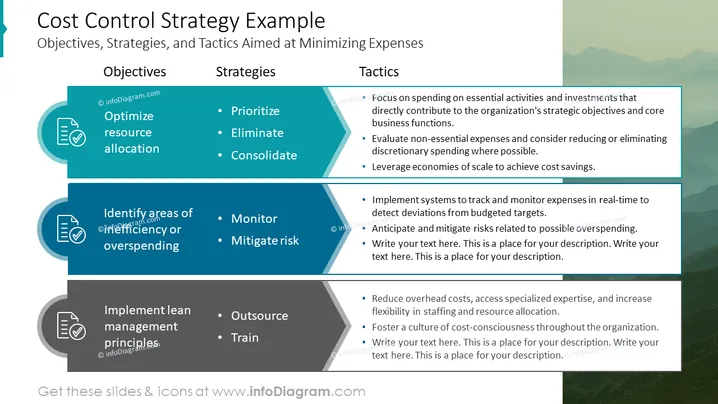
The slide is titled "Cost Control Strategy Example" and outlines Objectives, Strategies, and Tactics aimed at minimizing expenses in three columns. In the first column, under Objectives, are "Optimize resource allocation" explaining efficient use of resources, and "Identify areas of inefficiency or overspending," which means finding parts of the business that are not cost-effective. The second column lists Strategies such as "Prioritize," "Eliminate," and "Consolidate," suggesting ranking expenses by importance, cutting unnecessary expenses, and merging resources respectively. "Monitor" and "Mitigate risk" under Strategies imply tracking expenditure and reducing financial risks. The last column contains Tactics like focusing on essential activities, evaluating non-essential expenses, leveraging economies of scale, implementing systems for real-time expense tracking, and fostering cost-consciousness within the company.
The overall look of the slide is modern and sleek, with a clean layout that facilitates easy reading and comprehension. The use of icons adds a visual element which aids in quickly grasping the concepts presented.



