
Reviews
The icons are fantastic, easy to use, and will add value to any project or presentation. Keep up the great work.
I love how simple infoDiagram's solutions are and the personal interest they took in my work. Recommended 1000%!
The crisp, clean look of the graphics, and the fact that it allowed me to easily edit and change the colors to match the template was my main reason for purchasing them.
Description
Conveyor Belt Illustration – List of 4 Objectives
Slide Content
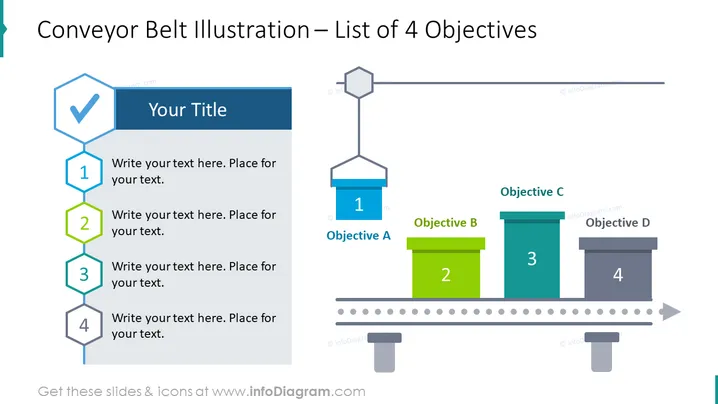
This slide represents a list of 4 objectives to be achieved in a process, akin to sequential steps in a production line. Each step or objective is visually showcased both on the left side, with numbers 1 to 4 inside hexagons followed by editable text placeholders, implying a chronology or checklist, and parallely on a graphical conveyor belt, with boxes labeled 'Objective A' to 'Objective D', suggesting the progression or development of a project or tasks moving towards completion.
Graphical Look
- A large, bold title at the top declares the theme of the slide "Conveyor Belt Illustration – List of 4 Objectives".
- To the left, a vertical sequence of four hexagons, each containing a number from 1 to 4, with a text placeholder adjacent to it. The hexagons are connected to each other by lines implying a flow or sequence.
- The hexagon containing the number '1' has a checkmark symbol, insinuating the step is either important or completed.
- A conveyor belt graphic spans across the middle of the slide from the left side towards the right, reinforcing the theme of processes or progress.
- Above the conveyor belt, there are boxes of varying heights representing the four objectives, with the first one labeled "Objective A" and so on, up to "Objective D".
- Each box corresponding to an objective has a different color and stands on a segment of the conveyor, with a number correspondent to the list on the left.
- A rightward facing arrow at the end of the conveyor belt implies an ongoing process or direction.
The slide combines text and graphical elements in a well-organized, visually cohesive way, using the metaphor of a conveyor belt to effectively illustrate a progression of steps or stages. The design is clean and professional, employing a limited color palette for clarity and emphasis.
Use Cases
- To outline the stages ## Conveyor Belt Illustration – List of 4 Objectives
Slide Content
The PowerPoint slide provides a visual representation of a process broken down into four objectives, using the analogy of items progressing along a conveyor belt. This format is conducive for explaining sequential steps in project management, showcasing a timeline of deliverables, or highlighting key achievement milestones. Each objective is symbolized by a numbered box on the conveyor belt, corresponding to the detailed descriptions provided on the left side of the slide.
Graphical Look
- The main title of the slide, "Conveyor Belt Illustration – List of 4 Objectives", is prominently displayed at the top of the slide in a large font.
- On the left side, there's a checklist represented by a vertical stack of hexagonal shapes numbered 1 through 4, each with a corresponding line of text beside it.
- The first hexagon contains a checkmark symbol, possibly indicating completion or priority.
- The central part of the slide features a graphic of a conveyor belt which runs from the left side to the right side of the slide.
- Resting on the conveyor belt are four stylized boxes or containers, each bearing a number and letter combination to represent objectives (Objective A to D), with heights that vary as a possible indicator of priority or progress levels.
- Each box has its own distinct color: blue, green, teal, and grey, which correspond with their assigned number from the list.
- The conveyor belt itself has a slightly shaded dimensional appearance and includes a right-pointing grey arrow at its end, denoting movement or workflow direction.
The slide features a clean, professional design with colors that are used purposefully to distinguish each objective. The graphic elements are balanced and complement the textual content, resulting in a visually engaging presentation style.
Use Cases
- To outline the stages of a project or initiative in a business presentation, showing progress from inception to completion.
- For describing a workflow process or illustrating a production line in an industrial or manufacturing context, where the conveyance metaphor is especially relevant.
- To introduce a step-by-step strategy in marketing or sales pitches, where each objective can represent a phase in customer outreach or product development.
- As an educational tool in training sessions for demonstrating sequential tasks or protocols that need to be followed in a specific order.
How to Edit
How to edit text & colors

How to expand / shorten diagram

How to Replace Icons in infoDiagram PPT


