
Reviews
The icons are fantastic, easy to use, and will add value to any project or presentation. Keep up the great work.
I love how simple infoDiagram's solutions are and the personal interest they took in my work. Recommended 1000%!
The crisp, clean look of the graphics, and the fact that it allowed me to easily edit and change the colors to match the template was my main reason for purchasing them.
Description
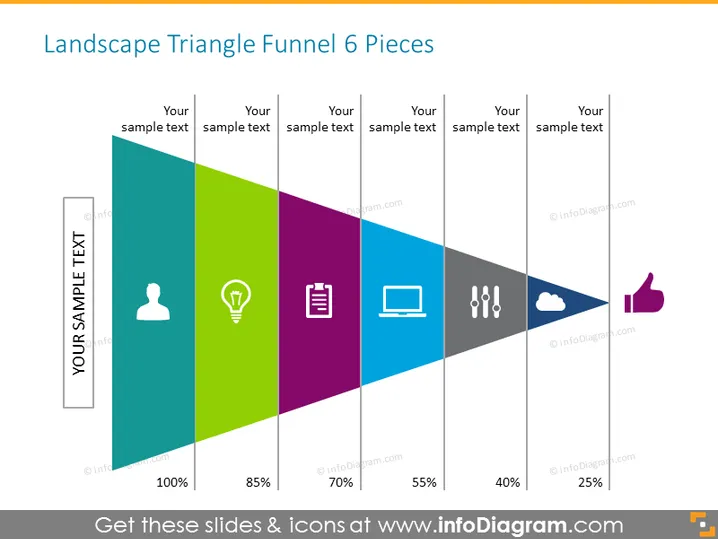
Landscape Triangle Funnel 6 Pieces
Slide Content
The PowerPoint slide titled "Landscape Triangle Funnel 6 Pieces" presents a funnel diagram that appears to indicate a process with six stages, each one represented by a different colored triangle with varying widths corresponding to percentages that likely signify stage conversion rates or completion levels (100%, 85%, 70%, 55%, 40%, 25%). Each triangle has an icon and placeholder text, suggesting the customization for specific concepts like user demographics, ideas, documentation, technology, issues, and success.
Graphical Look
- The slide background is white.
- A horizontal funnel composed of six colored triangles arranged from left to right, showing a gradient from wide to narrow segments.
- Each triangle represents a different stage of the process with the colors: grey, green, purple, violet, blue, and grey towards the end.
- Icons are centrally placed in each triangle, including a person silhouette, lightbulb, document, laptop, exclamation marks, and a cloud with dots.
- Above each triangle, there is placeholder text "Your sample text" in a black sans-serif font.
- On the left side, there's a vertical rectangular shape with the text "YOUR SAMPLE TEXT" rotated 90 degrees counterclockwise.
- Percentages in bold black text appear below the triangles, denoting the width of each corresponding section of the funnel.
- A thumbs-up icon appears at the end of the funnel, after the narrowest grey triangle.
The slide has a contemporary, clean design leveraging simple shapes and icons to convey various stages of a process. The visual hierarchy is well-defined, guiding the viewer's eye from the broadest stage to the narrowest end.
Use Cases
- To illustrate a sales or marketing conversion funnel, showing the journey from prospect to customer.
- For project management presentations, depicting phased project progress or milestone achievements.
- As a visual aid in educational contexts to explain sequential processes or step-by-step guidelines.
- In strategic planning meetings, to communicate stages of customer lifecycle or product development.
How to Edit
How to edit text & colors

How to expand / shorten diagram

How to Replace Icons in infoDiagram PPT


