
Reviews
Sus gráficos añaden un toque agradable a mis presentaciones y recientemente los usé para una de mis reuniones generales. Su conjunto de herramientas añade profesionalismo a mis diapositivas. En lugar de usar imágenes prediseñadas estándar.
Necesitaba un aspecto fresco para algunas de mis diapositivas. Había intentado encontrar una forma de crear un efecto de pincel, de subrayar, acentuar, añadir algo de color y los marcadores escritos a mano fueron justo lo que necesitaba. Muy fácil de usar, fácil de ajustar el tamaño, cambiar el color. Fue una solución asequible y perfecta, y estoy feliz de recomendarla.
El aspecto nítido y limpio de los gráficos, y el hecho de que me permitiera editar y cambiar fácilmente los colores para que coincidieran con la plantilla fue mi principal razón para comprarlos.
Description
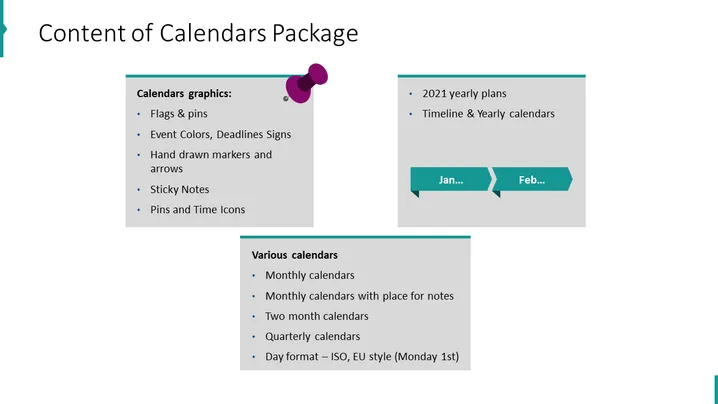
Content of Calendars Package
Slide Content
The slide appears to outline the features included in a "Calendars Package". It lists calendar graphics, such as flags & pins, event colors, deadline signs, hand-drawn markers, arrows, sticky notes, and pins and time icons. These elements likely assist in marking important dates and planning. There's also mention of "2021 yearly plans", "Timeline & Yearly calendars", and "Various calendars", including monthly, two-month, quarterly, and US-style day formats. The formatting options facilitate a range of scheduling needs and preferences.
Graphical Look
- A large title in bold, dark text at the top, "Content of Calendars Package".
- Two colored rectangular blocks, one in pale blue and one in dark teal, labeled with white text.
- A series of bullet points within each block that itemize features of the package.
- A visual example of a timeline at the top right corner, with arrows pointing between "Jan..." and "Feb...".
- A decorative element consisting of three overlapping circles in shades of purple adjacent to the bullet points.
The slide has a clean and organized layout with a contrasting color scheme that is visually appealing. The use of icons and the graphical timeline provides a quick understanding of the package contents.
Use Cases
- Presenting a new calendar or scheduling tool to a project team.
- Demonstrating the features of a calendar software during a sales pitch or product demo.
- Outlining the annual planning resources available to employees in a company-wide meeting.
- Including as part of a training session on effective time management and organization tools.
How to Edit
How to edit text & colors

How to expand / shorten diagram

How to Replace Icons in infoDiagram PPT


