
Your graphics add a nice touch to my presentations and I recently used them for one of my all-hands meetings. Your toolbox adds professionalism to my slides. Instead of using standard clipart.
Claude Jones, Director of Engineer, @Walmartlabs, USA
Your graphics add a nice touch to my presentations and I recently used them for one of my all-hands meetings. Your toolbox adds professionalism to my slides. Instead of using standard clipart.
Claude Jones, Director of Engineer, @Walmartlabs, USA
I needed a fresh look at some of my slides. I've tried to find a way to create a paintbrush effect, to underline, accentuate, add some color and the handwritten markers were just the things. Very easy to use, easy to size, change the color. It was an affordable, perfect solution and I'm happy to recommend it.
Anonymous, US
The crisp, clean look of the graphics, and the fact that it allowed me to easily edit and change the colors to match the template was my main reason for purchasing them.
Brandie Jenkins, E-learning Developer, USA
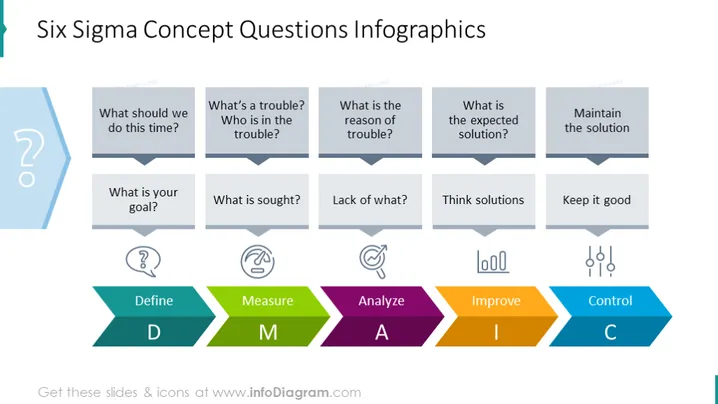
The slide features a graphical representation of the Six Sigma methodology with related concept questions designed to guide a project's progression. Starting with "Define," it prompts identifying the project's purpose with questions like "What should we do this time?" and "What is your goal?" For "Measure," it asks "What is sought?" and "Lack of what?" to understand the data requirements. "Analyze" scrutinizes the problem through "What’s a trouble?" and "Who is in trouble?" leading to "Improve" with solution-oriented queries "What is the expected solution?" and "Think solutions." Finally, "Control" ensures sustained success, asking to "Maintain the solution" and "Keep it good."
The overall look of the slide is modern and clean, with an emphasis on visual cues to delineate the different stages of Six Sigma. The color-coded chevrons and associated icons effectively represent the structured approach of the process.




