

Your graphics add a nice touch to my presentations and I recently used them for one of my all-hands meetings. Your toolbox adds professionalism to my slides. Instead of using standard clipart.
Claude Jones, Director of Engineer, @Walmartlabs, USA

Your graphics add a nice touch to my presentations and I recently used them for one of my all-hands meetings. Your toolbox adds professionalism to my slides. Instead of using standard clipart.
Claude Jones, Director of Engineer, @Walmartlabs, USA
I needed a fresh look at some of my slides. I've tried to find a way to create a paintbrush effect, to underline, accentuate, add some color and the handwritten markers were just the things. Very easy to use, easy to size, change the color. It was an affordable, perfect solution and I'm happy to recommend it.
Anonymous, US
The crisp, clean look of the graphics, and the fact that it allowed me to easily edit and change the colors to match the template was my main reason for purchasing them.
Brandie Jenkins, E-learning Developer, USA
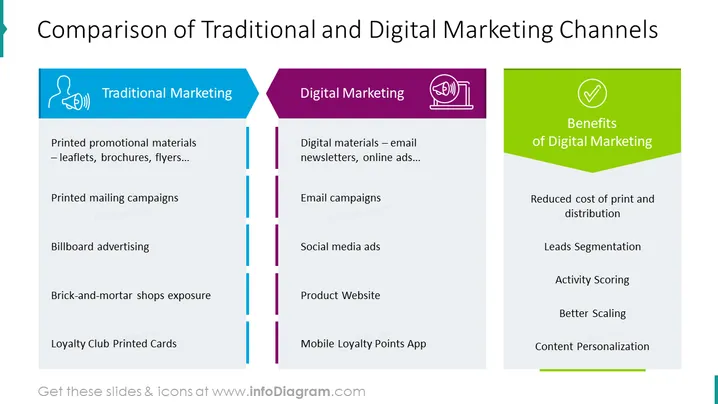
This example slide shows a table with a comparison between traditional and digital marketing. Using a professionally designed template such as this allows you to save time on your presentation, and provides your audience with an easier format to understand - especially if they are visual learners. You could use this template to make a product comparison (in terms of their marketing), compare prices of different channels, effects on business performance, amount of work required for different strategies, compare various models, and compare different campaigns (e.g. small, medium, or large ad campaigns), plan your next steps, or use to complement a presentation on a topic such as digital transformation (as with the other slides in this deck), etc. All elements are fully editable, with icons coming in a vector graphic format. Change text & data, adapt to your site colors, add shadows and other effects, download from PowerPoint into a PDF format etc.
##Slide contents: Marketing Comparison PPT, Vector Graphic Illustrations, Comparison Table, Placeholder Text, Colorful Shapes, Line Graphics, Triangle Graphics, Person & Megaphone Icon, Megaphone & Computer Icon, Tick Icon, Resizable Shapes, White Background



