
Reviews
Sus gráficos añaden un toque agradable a mis presentaciones y recientemente los usé para una de mis reuniones generales. Su conjunto de herramientas añade profesionalismo a mis diapositivas. En lugar de usar imágenes prediseñadas estándar.
Necesitaba un aspecto fresco para algunas de mis diapositivas. Había intentado encontrar una forma de crear un efecto de pincel, de subrayar, acentuar, añadir algo de color y los marcadores escritos a mano fueron justo lo que necesitaba. Muy fácil de usar, fácil de ajustar el tamaño, cambiar el color. Fue una solución asequible y perfecta, y estoy feliz de recomendarla.
El aspecto nítido y limpio de los gráficos, y el hecho de que me permitiera editar y cambiar fácilmente los colores para que coincidieran con la plantilla fue mi principal razón para comprarlos.
Description
Comparing 2 Concepts with Summary Column, HR Example
Slide Content
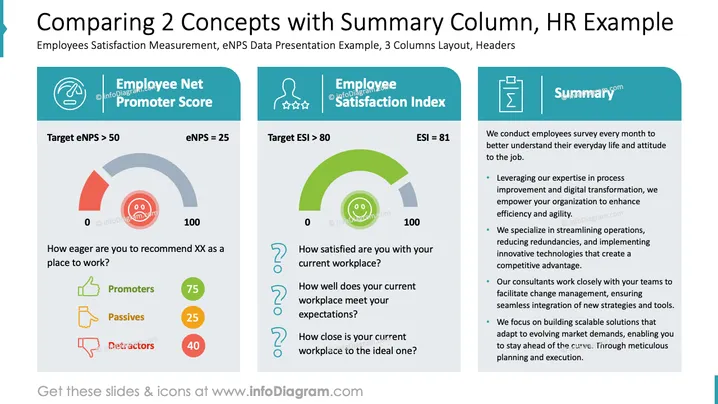
The slide presents a comparison of two key concepts: Employee Net Promoter Score (eNPS) and Employee Satisfaction Index (ESI). The eNPS measures how likely employees are to recommend their workplace, aiming for a target greater than 50; the current score is 25. Satisfaction levels are broken down into promoters, passives, and detractors. The ESI evaluates employee satisfaction with their workplace, aiming for a target over 80, with the current score at 81. A summary on the right outlines strategies for enhancing workplace efficiency and transformation through expertise in process improvement, streamlined operations, and innovative solutions.
Graphical Look
- The slide features a three-column layout with rounded corners at the top.
- The left column has an icon of a smiling face with a gauge-meter graphic showing eNPS.
- It includes colored icons: green thumbs up for promoters, yellow hand for passives, and red thumbs down for detractors.
- The middle column has a question mark icon with a semicircular gauge showing ESI.
- The right column uses a clipboard icon, providing text summary points with bullet points.
- The color scheme includes teal headers and light gray backgrounds with black and colored text.
Overall, the slide is visually structured with clear sections and a balanced use of icons and colors to illustrate complex concepts effectively. The layout aids in making comparisons and summaries understandable at a glance.
Use Cases
- Presenting HR metrics in employee satisfaction meetings.
- Demonstrating company performance in a monthly or quarterly report.
- Showcasing HR strategies and improvements during management reviews.
- Educating teams on the importance of employee engagement and satisfaction metrics.
How to Edit
How to edit text & colors

How to expand / shorten diagram

How to Replace Icons in infoDiagram PPT


