

Your graphics add a nice touch to my presentations and I recently used them for one of my all-hands meetings. Your toolbox adds professionalism to my slides. Instead of using standard clipart.
Claude Jones, Director of Engineer, @Walmartlabs, USA

Your graphics add a nice touch to my presentations and I recently used them for one of my all-hands meetings. Your toolbox adds professionalism to my slides. Instead of using standard clipart.
Claude Jones, Director of Engineer, @Walmartlabs, USA
I needed a fresh look at some of my slides. I've tried to find a way to create a paintbrush effect, to underline, accentuate, add some color and the handwritten markers were just the things. Very easy to use, easy to size, change the color. It was an affordable, perfect solution and I'm happy to recommend it.
Anonymous, US
The crisp, clean look of the graphics, and the fact that it allowed me to easily edit and change the colors to match the template was my main reason for purchasing them.
Brandie Jenkins, E-learning Developer, USA
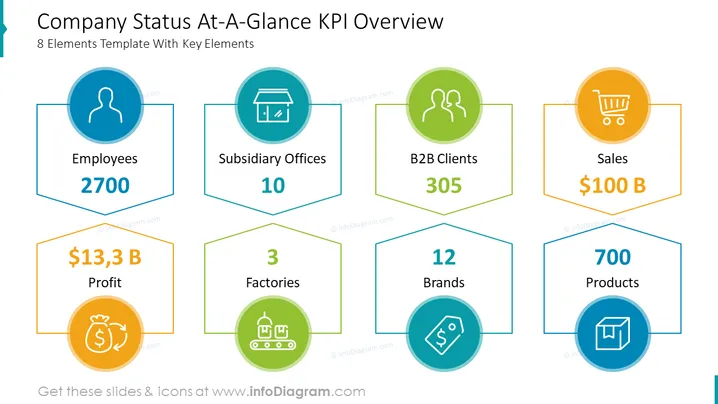
Overall, the slide is well-designed and easy to read. It effectively communicates the company's current status and key performance indicators.
Executive briefings are typically short, high-level presentations that are given to senior executives. A company status at-a-glance KPI overview slide can be used in an executive briefing to give the executives a quick overview of the company's current performance in key areas.
Board of Directors meetings are typically held on a quarterly or annual basis, and they are a time for the board of directors to review the company's performance and make decisions about the future. A company status at-a-glance KPI overview slide can be used in a board of directors meeting to give the board a quick overview of the company's current status and to identify any areas where the company needs to improve.
Town hall meetings are typically held on a quarterly or annual basis, and they are a time for the company's leadership to communicate with its employees about the company's performance and future plans. A company status at-a-glance KPI overview slide can be used in a town hall meeting to give employees a clear and concise overview of the company's current status.
Investor presentations are typically given to potential investors to persuade them to invest in the company. A company status at-a-glance KPI overview slide can be used in an investor presentation to give investors a quick overview of the company's current performance and its future potential.
Sales presentations are typically given to potential customers to persuade them to buy the company's products or services. A company status at-a-glance KPI overview slide can be used in a sales presentation to show the potential customer that the company is a stable and successful company that is worth doing business with.
Marketing presentations are typically given to potential customers or partners to promote the company's products or services. A company status at-a-glance KPI overview slide can be used in a marketing presentation to show potential customers or partners that the company is a leader in its industry and that its products or services are high quality.
Product launch presentations are typically given to potential customers to introduce them to a new product or service that the company is offering. A company status at-a-glance KPI overview slide can be used in a product launch presentation to give potential customers a sense of the company's strength and stability.
Quarterly and annual reports are typically published by companies to inform their shareholders and other stakeholders about the company's performance over a given period of time. A company status at-a-glance KPI overview slide can be included in a quarterly or annual report to give stakeholders a quick and easy way to see the company's current performance in key areas.
A company status at-a-glance KPI overview slide can be used in any type of presentation that needs to communicate the company's current status and key performance indicators in a clear and concise way. This includes presentations to customers, partners, investors, employees, and the general public.



