

Your graphics add a nice touch to my presentations and I recently used them for one of my all-hands meetings. Your toolbox adds professionalism to my slides. Instead of using standard clipart.
Claude Jones, Director of Engineer, @Walmartlabs, USA

Your graphics add a nice touch to my presentations and I recently used them for one of my all-hands meetings. Your toolbox adds professionalism to my slides. Instead of using standard clipart.
Claude Jones, Director of Engineer, @Walmartlabs, USA
I needed a fresh look at some of my slides. I've tried to find a way to create a paintbrush effect, to underline, accentuate, add some color and the handwritten markers were just the things. Very easy to use, easy to size, change the color. It was an affordable, perfect solution and I'm happy to recommend it.
Anonymous, US
The crisp, clean look of the graphics, and the fact that it allowed me to easily edit and change the colors to match the template was my main reason for purchasing them.
Brandie Jenkins, E-learning Developer, USA
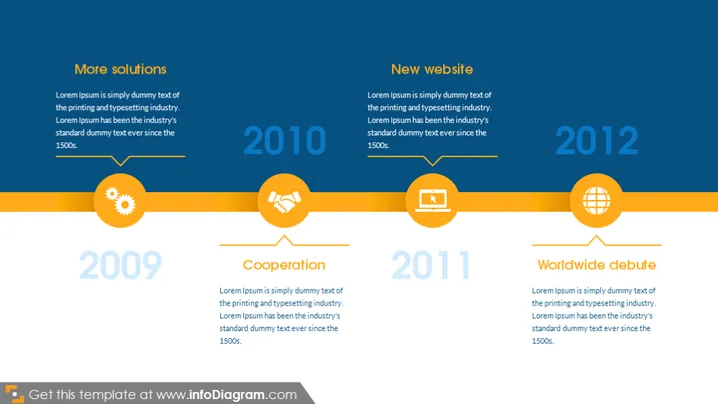
The slide appears to focus on four significant milestones or developments for a company or project, each labeled with a different year from 2009 to 2012. The 2009 milestone is titled "More solutions," suggesting a period of increased offerings or problem-solving capabilities, which generally means expanding services or product lines. The 2010 event is "Cooperation," which often implies strategic partnerships or teamwork enhancements. For 2011, there's a "New website," indicating the launch or revamp of an online presence, a vital step for modern business visibility and user engagement. Finally, the 2012 marker is "Worldwide debute," likely signifying international expansion or global product launch, an essential growth phase for companies aiming at new markets.
The slide has a clean, modern, and professional look with a well-structured layout. The consistent use of color and simple icons helps to convey the information clearly and without distraction.
Presenting a company's historical milestones during a corporate presentation to showcase growth and development.
Outlining key stages of a project in a timeline format for status updates or reviews.
Summarizing the progress and achievements of a business in investor meetings or annual reports.
Providing an overview of brand evolution in marketing materials or at trade shows.



