
Reviews
Sus gráficos añaden un toque agradable a mis presentaciones y recientemente los usé para una de mis reuniones generales. Su conjunto de herramientas añade profesionalismo a mis diapositivas. En lugar de usar imágenes prediseñadas estándar.
Necesitaba un aspecto fresco para algunas de mis diapositivas. Había intentado encontrar una forma de crear un efecto de pincel, de subrayar, acentuar, añadir algo de color y los marcadores escritos a mano fueron justo lo que necesitaba. Muy fácil de usar, fácil de ajustar el tamaño, cambiar el color. Fue una solución asequible y perfecta, y estoy feliz de recomendarla.
El aspecto nítido y limpio de los gráficos, y el hecho de que me permitiera editar y cambiar fácilmente los colores para que coincidieran con la plantilla fue mi principal razón para comprarlos.
Description
##Company Shareholding Structure and Voting Rights
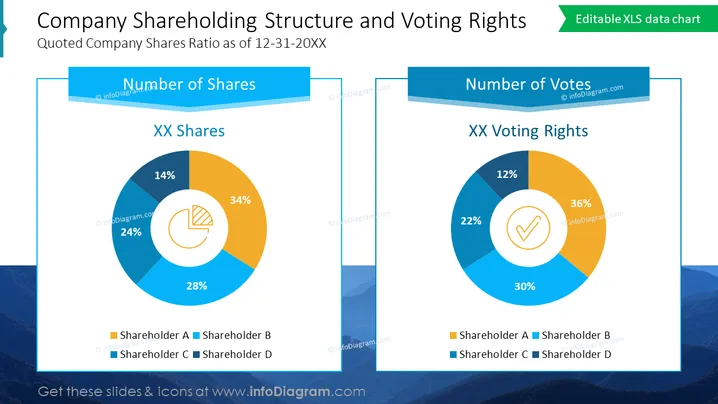
This PowerPoint slide is tailored for financial reporting presentations, providing a clear comparison between a company's shareholding structure and the associated voting rights. It is crafted to deliver a visual representation of ownership and control, often used in annual reports, investor relations presentations, and board meetings to depict the influence different shareholders have over company decisions.
##What Does This Company Shareholding Structure and Voting Rights Include?
- Two Excel-driven donut charts side by side, each representing a different aspect: one for shares, one for votes
- Each chart is divided into four segments with varying colors and percentage labels
- Above each chart is a banner with text
- Icons inside the charts that relate to the content they represent: pie chart for shares and checkmark for votes
- A legend below each chart correlating colors to shareholder categories
- The slide's title in a large font at the top
- A mountainous landscape in the background in a monochrome blue shade
##This Company Shareholding Structure and Voting Rights is a part of our Listed Company Financial Report Presentation PPT Template.
How to Edit
How to edit text & colors

How to expand / shorten diagram

How to Replace Icons in infoDiagram PPT


