
Reviews
Vos graphiques ajoutent une belle touche à mes présentations et je les ai récemment utilisés pour l'une de mes réunions générales. Votre boîte à outils ajoute du professionnalisme à mes diapositives. Au lieu d'utiliser des cliparts standards.
J'avais besoin d'un nouveau regard sur certaines de mes diapositives. J'ai essayé de trouver un moyen de créer un effet de pinceau, de souligner, d'accentuer, d'ajouter de la couleur et les marqueurs manuscrits étaient exactement ce qu'il fallait. Très facile à utiliser, facile à ajuster la taille, à changer la couleur. C'était une solution abordable et parfaite et je suis heureux de la recommander.
L'aspect net et épuré des graphiques, et le fait qu'il m'ait permis d'éditer et de changer facilement les couleurs pour les adapter au modèle, ont été les principales raisons de mon achat.
Description
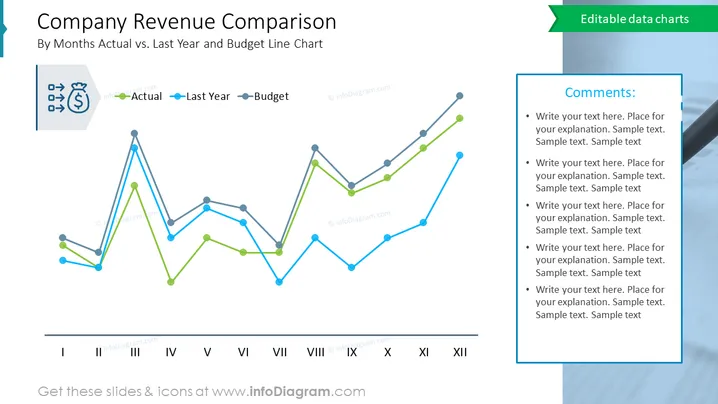
Company Revenue Comparison
Slide Content:
The slide is a graphical representation of a company's monthly revenue comparison over a year, plotting actual revenue against last year's figures and the budgeted projections. The line chart provides a clear month-by-month comparison, illustrating periods of overperformance or underperformance relative to the previous year and budget. This visual tool is crucial for financial analysis, enabling quick identification of trends, seasonal impacts, and the need for budgetary adjustments.
Graphical Look:
- Three line graphs, each in a different color, represent actual revenue, last year's revenue, and budgeted revenue.
- Each line graph is labeled with corresponding icons: a bag of money for actual, an arrow for last year, and a budget icon.
- The chart is set against a white background with Roman numerals indicating the months from I to XII at the bottom.
- The right side of the slide has a text box labeled "Comments" with bullet points for additional notes.
- The overall color scheme includes shades of blue and green, contributing to a clean and professional aesthetic.
Overall, the slide has a streamlined and informative design, with color-coded lines making it easy to differentiate between the data sets for quick analysis.
Use Cases:
Such a slide would be useful in:
- Monthly financial review meetings to assess performance against projections.
- Quarterly business reviews with stakeholders to provide an update on financial health.
- Budget planning sessions to adjust forecasts based on actual performance.
- Investor presentations to demonstrate the company's revenue trends and financial stewardship.
How to Edit
How to edit text & colors

How to expand / shorten diagram

How to Replace Icons in infoDiagram PPT


