
Reviews
Your graphics add a nice touch to my presentations and I recently used them for one of my all-hands meetings. Your toolbox adds professionalism to my slides. Instead of using standard clipart.
I needed a fresh look at some of my slides. I've tried to find a way to create a paintbrush effect, to underline, accentuate, add some color and the handwritten markers were just the things. Very easy to use, easy to size, change the color. It was an affordable, perfect solution and I'm happy to recommend it.
The crisp, clean look of the graphics, and the fact that it allowed me to easily edit and change the colors to match the template was my main reason for purchasing them.
Description
##Monthly Review Comparing Data in One Chart With Description Layout
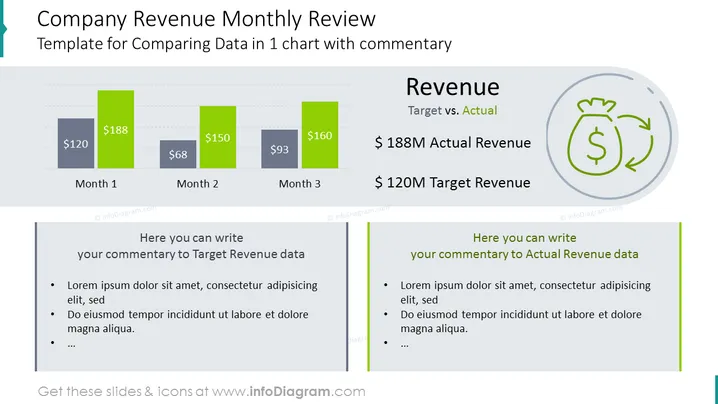
Use this PowerPoint template to illustrate the company's monthly revenue statistics. It compares actual and targeted financial metrics with a detailed performance description. This visual review will work well for periodic summaries, planning, or setting new performance goals.
##What Does This Monthly Review Comparing Data in One Chart With Description Layout Include?
- financial section with 3 editable Excel-driven bar charts and text summary with an icon
- 2 light grey text containers for detailed descriptions with matching colorful graphics
- an outline icon of a bag with money, investment, revenue, ROI
This Monthly Review Comparing Data in One Chart With Description Layout is a part of our Company Finance Data Charts PPT Template.
How to Edit
How to edit text & colors

How to expand / shorten diagram

How to Replace Icons in infoDiagram PPT


