
Reviews
Sus gráficos añaden un toque agradable a mis presentaciones y recientemente los usé para una de mis reuniones generales. Su conjunto de herramientas añade profesionalismo a mis diapositivas. En lugar de usar imágenes prediseñadas estándar.
Necesitaba un aspecto fresco para algunas de mis diapositivas. Había intentado encontrar una forma de crear un efecto de pincel, de subrayar, acentuar, añadir algo de color y los marcadores escritos a mano fueron justo lo que necesitaba. Muy fácil de usar, fácil de ajustar el tamaño, cambiar el color. Fue una solución asequible y perfecta, y estoy feliz de recomendarla.
El aspecto nítido y limpio de los gráficos, y el hecho de que me permitiera editar y cambiar fácilmente los colores para que coincidieran con la plantilla fue mi principal razón para comprarlos.
Description
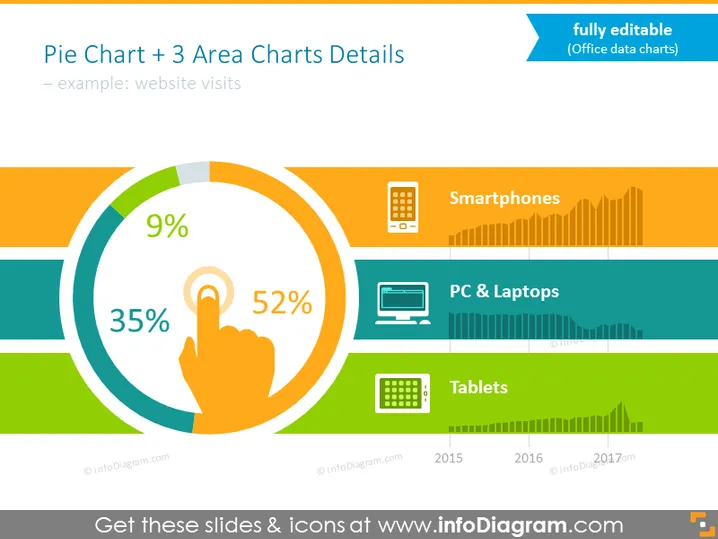
Pie Chart + 3 Area Charts Details
Slide Content
The slide presents data visualization for "website visits" using a central pie chart complemented by three horizontal area charts labeled Smartphones, PC & Laptops, and Tablets. Each area chart is associated with a different color and includes a corresponding icon. The pie chart shows a distribution of 52%, 35%, and 9%, likely signifying the proportion of visits from different sources or devices, and the area charts exhibit trends over time from 2015 to 2017.
Graphical Look
- A large, central pie chart with three segments colored differently: orange, blue, and green.
- Three horizontal area charts to the right, each with rising and falling patterns:
- The top one is colored orange, for Smartphones, showing a general increase in data points.
- The middle one is blue, for PC & Laptops, with variable peaks.
- The bottom one is green, for Tablets, also displaying variability.
- Icons representing devices are placed next to each area chart:
- A mobile phone icon for Smartphones.
- A desktop computer for PC & Laptops.
- A tablet icon for Tablets.
- Years indicated at the bottom axis of the area charts ranging from 2015 to 2017.
- Text on the upper right indicating the charts are fully editable.
The overall look of the slide is clean and modern, with a coherent color scheme that links the pie chart to the corresponding area charts. It utilizes flat design icons to help clarify the data points represented.
Use Cases
- Presenting web analytics data to show device-based traffic distribution over time.
- Comparing performance metrics across different platforms during quarterly business reviews.
- Visualizing user engagement trends by device type in marketing strategy presentations.
- Providing an overview of multi-platform usage data in stakeholder reports.
How to Edit
How to edit text & colors

How to expand / shorten diagram

How to Replace Icons in infoDiagram PPT


