

Your graphics add a nice touch to my presentations and I recently used them for one of my all-hands meetings. Your toolbox adds professionalism to my slides. Instead of using standard clipart.
Claude Jones, Director of Engineer, @Walmartlabs, USA

Your graphics add a nice touch to my presentations and I recently used them for one of my all-hands meetings. Your toolbox adds professionalism to my slides. Instead of using standard clipart.
Claude Jones, Director of Engineer, @Walmartlabs, USA
I needed a fresh look at some of my slides. I've tried to find a way to create a paintbrush effect, to underline, accentuate, add some color and the handwritten markers were just the things. Very easy to use, easy to size, change the color. It was an affordable, perfect solution and I'm happy to recommend it.
Anonymous, US
The crisp, clean look of the graphics, and the fact that it allowed me to easily edit and change the colors to match the template was my main reason for purchasing them.
Brandie Jenkins, E-learning Developer, USA
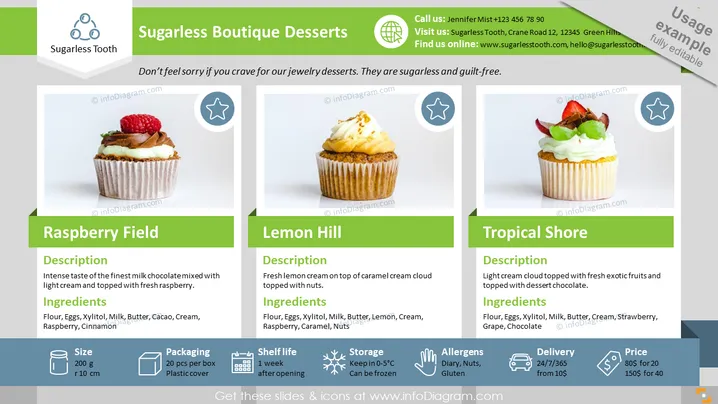
The PowerPoint slide showcases a line of desserts from "Sugarless Boutique Desserts," emphasizing that they are sugar-free and guilt-free. It features three dessert items: Raspberry Field, Lemon Hill, and Tropical Shore, each with a captivating image, a brief description, and a list of ingredients. Raspberry Field offers a chocolate and raspberry experience, Lemon Hill presents a lemon and caramel fusion, and Tropical Shore combines exotic fruits with chocolate. Each dessert's size, packaging, shelf life, storage requirements, allergens, delivery options, and price are neatly detailed, catering to health-conscious consumers seeking indulgent treats without sugar.
The slide's design is clean and vibrant, with a clear focus on the dessert images and product information. The color scheme and icons are used effectively to differentiate each section, creating an attractive and informative display.



