
Reviews
Sus gráficos añaden un toque agradable a mis presentaciones y recientemente los usé para una de mis reuniones generales. Su conjunto de herramientas añade profesionalismo a mis diapositivas. En lugar de usar imágenes prediseñadas estándar.
Necesitaba un aspecto fresco para algunas de mis diapositivas. Había intentado encontrar una forma de crear un efecto de pincel, de subrayar, acentuar, añadir algo de color y los marcadores escritos a mano fueron justo lo que necesitaba. Muy fácil de usar, fácil de ajustar el tamaño, cambiar el color. Fue una solución asequible y perfecta, y estoy feliz de recomendarla.
El aspecto nítido y limpio de los gráficos, y el hecho de que me permitiera editar y cambiar fácilmente los colores para que coincidieran con la plantilla fue mi principal razón para comprarlos.
Description
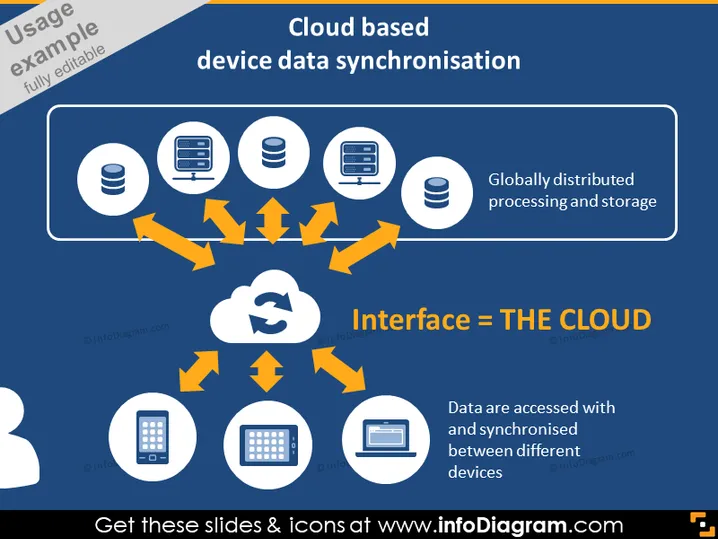
Cloud based device data synchronisation
Slide Content
The PowerPoint slide presents the concept of "Cloud based device data synchronisation," explaining how data are accessed and synchronized across different devices through the cloud, which acts as an interface. It highlights that this process involves globally distributed processing and storage, indicating a wide-reaching and scalable technology infrastructure. The concept means that data on various devices is constantly updated to reflect the most current information by leveraging cloud computing.
Graphical Look
- The slide background is a deep blue color.
- The title of the slide is in white and orange, emphasizing the key topic with "Cloud based device data synchronisation."
- A central cloud icon represents the interface, labeled "THE CLOUD" in large white text on an orange banner.
- Around the cloud are two desktop computers, two databases, and a laptop, each connected to the cloud with orange arrows, symbolizing data sync directions.
- At the bottom left and right, there are icons of a smartphone and a tablet, also connected to the cloud with orange arrows.
- Two text boxes with white and orange text provide extra information tied to distributed processing and device synchronization.
- The icons and elements are designed with a flat graphic style and simple lines for clarity and modern aesthetics.
The slide has a professional and technology-centric design with a unified color scheme and clear visual flow that directs the viewer's attention to the cloud as the central hub of synchronization.
Use Cases
- To explain the concept of cloud computing and data synchronization in an IT project presentation.
- During business strategy meetings to illustrate how a company’s data management will be handled.
- In a training session for staff to understand the infrastructure supporting their work environment.
- While pitching a software solution to clients, emphasizing the benefits of seamless data integration across devices.
How to Edit
How to edit text & colors

How to expand / shorten diagram

How to Replace Icons in infoDiagram PPT


