
Reviews
Sus gráficos añaden un toque agradable a mis presentaciones y recientemente los usé para una de mis reuniones generales. Su conjunto de herramientas añade profesionalismo a mis diapositivas. En lugar de usar imágenes prediseñadas estándar.
Necesitaba un aspecto fresco para algunas de mis diapositivas. Había intentado encontrar una forma de crear un efecto de pincel, de subrayar, acentuar, añadir algo de color y los marcadores escritos a mano fueron justo lo que necesitaba. Muy fácil de usar, fácil de ajustar el tamaño, cambiar el color. Fue una solución asequible y perfecta, y estoy feliz de recomendarla.
El aspecto nítido y limpio de los gráficos, y el hecho de que me permitiera editar y cambiar fácilmente los colores para que coincidieran con la plantilla fue mi principal razón para comprarlos.
Description
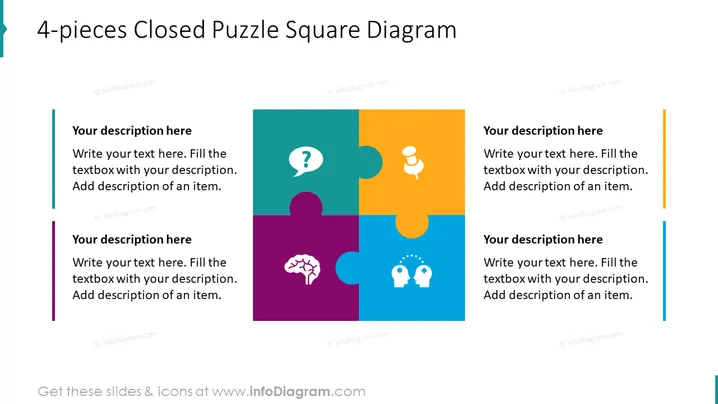
4-pieces Closed Puzzle Square Diagram
Slide Content
The PowerPoint slide titled "4-pieces Closed Puzzle Square Diagram" uses a puzzle metaphor to illustrate interconnected elements. Each of the four puzzle pieces can represent a concept or part of a process; for example, "Your description here" prompts indicate space for providing specific explanations. The presence of iconic representations like a question mark, light bulb, brain, and two people with gears in their heads implies themes of inquiry, ideas, cognition, and collaboration, respectively.
Graphical Look
- The slide background is white, providing a clean and uncluttered canvas for content.
- Four puzzle pieces of differing colors (teal, orange, purple, and blue) fit together to form a square, suggesting interconnectedness.
- Each puzzle piece has a unique icon: a white question mark, a white light bulb, a white brain, and a symbol of two heads with gears, symbolizing different concepts or topics.
- Beside each puzzle piece, there are vertical bars in colors that match the puzzle pieces, enhancing visual cohesion.
- Text placeholders accompanied by the words "Your description here" are present beside each colored bar, inviting users to insert their own content.
- The font used for the text is sans-serif, which contributes to the slide's modern look.
The slide has a clean and professional appearance, utilizing bright colors and clear icons to represent different ideas or segments within a unified whole. The arrangement allows for an easy understanding of how the parts fit together to form a bigger picture.
Use Cases
- Presenting different components of a business strategy that must work together harmoniously.
- Illustrating how various departments within an organization contribute to a single project.
- Explaining the stages of a collaborative process in product development.
- Displaying interrelated action items that are part of a larger initiative or plan.
How to Edit
How to edit text & colors

How to expand / shorten diagram

How to Replace Icons in infoDiagram PPT


