
Reviews
Deine Folien sind meine 'geheime Zutat', wenn es darum geht, meine Ideen Kunden zu visualisieren. Ich spare so viel Zeit.
Ihre Folien führen oft zu guten Kommentaren und Ideen meines Teams, die die endgültigen Folien verbessern.
Description
Closed Cycle Diagram – 5 Circle Elements
Slide Content
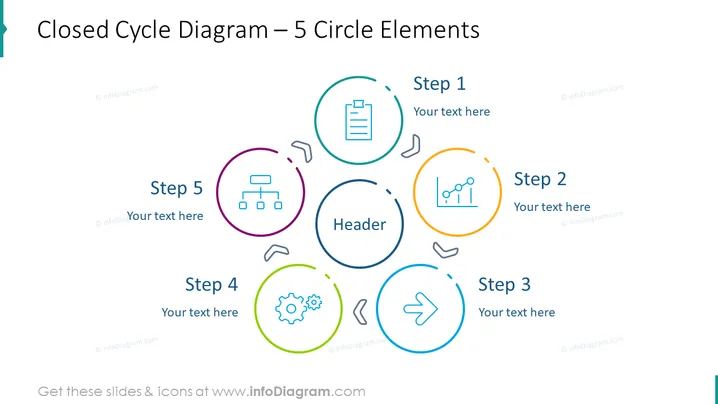
The PowerPoint slide presents a "Closed Cycle Diagram" with 5 circle elements depicting a cyclical process. Each circle represents a step within the cycle, labeled Step 1 through Step 5, with dedicated space for adding descriptive text. This layout is commonly used to describe processes with a repeating nature where the final step leads back to the initial step, demonstrating an ongoing loop or cycle. The circle for Step 1 encapsulates a clipboard icon, while Step 2 contains a trend line, symbolizing analysis or measurement. Step 3 features an arrow, typically representing direction or movement. Step 4 includes a gear icon, often associated with operations or mechanics, and Step 5 has an organizational chart, likely depicting structure or hierarchy.
Graphical Look
- The title "Closed Cycle Diagram – 5 Circle Elements" is prominently displayed at the top.
- Five circles of different colors are arranged in a circular formation, connected by curved arrows suggesting a cyclical flow.
- Each circle contains an icon and has a text label (e.g., "Step 1"), with additional space for explanatory text.
- The icons in the circles vary: a clipboard, a trend line graph, a right arrow, a gear, and an organizational chart, likely symbolizing different steps or aspects of a process.
- The design is clean with a minimalist aesthetic, using thin lines for both icons and connecting arrows.
- The color palette is vibrant, with each circle outlined in a distinct color—turquoise, orange, dark blue, green, and purple.
The slide has a modern and professional look, with a harmonious color scheme and clear design elements that make it easy to follow. The visual elements are well-spaced and maintain a balance that aids in conveying the cycle concept.
Use Cases
- Illustrating a business process that loops back to the beginning, such as a product development lifecycle.
- Depicting continuous improvement cycles like the PDCA (Plan-Do-Check-Act) framework used in quality management.
- Explaining the stages of a customer journey that repeats, for example, in subscription-based services.
- Presenting a workflow in project management that cycles through iterative phases, such as agile development methodology.
How to Edit
How to edit text & colors

How to expand / shorten diagram

How to Replace Icons in infoDiagram PPT


