

Your graphics add a nice touch to my presentations and I recently used them for one of my all-hands meetings. Your toolbox adds professionalism to my slides. Instead of using standard clipart.
Claude Jones, Director of Engineer, @Walmartlabs, USA

Your graphics add a nice touch to my presentations and I recently used them for one of my all-hands meetings. Your toolbox adds professionalism to my slides. Instead of using standard clipart.
Claude Jones, Director of Engineer, @Walmartlabs, USA
I needed a fresh look at some of my slides. I've tried to find a way to create a paintbrush effect, to underline, accentuate, add some color and the handwritten markers were just the things. Very easy to use, easy to size, change the color. It was an affordable, perfect solution and I'm happy to recommend it.
Anonymous, US
The crisp, clean look of the graphics, and the fact that it allowed me to easily edit and change the colors to match the template was my main reason for purchasing them.
Brandie Jenkins, E-learning Developer, USA
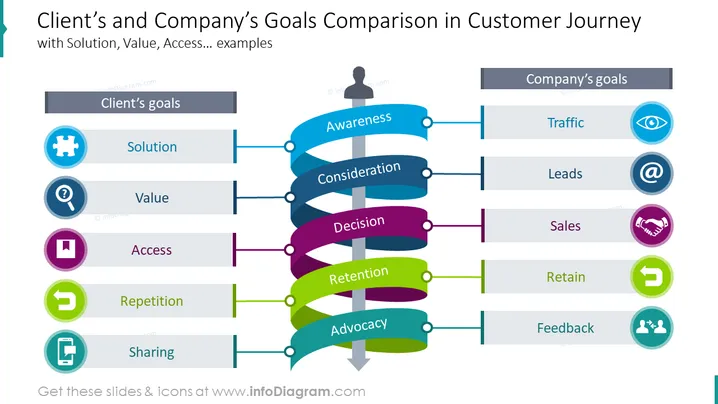
This infographic slide presents customer vs. business goals and objectives. In the awareness stage, the customer expects a solution to his pains and/or needs, while the company's objective is more traffic. In the consideration touchpoint, the customer relies on expected value, and the company is looking forward to generating as many leads as possible. Before making a decision, the client expects access to all resources in order to make a well-informed decision. The business objective is final sales. In the retention stage, the client expects the same treatment, or repetition of the process, and the business expects to retain the customers and build loyal relationships. In the advocacy stage, the customer shares his experience on social media and spreads mouth-to-mouth word, and the company expects feedback.
##Slide infographic description:
Ribbon Banner Vector, Text Blocks, Colorful Infographics, Arrow Vector, Man Icon, Customer Icon, Flat Outline Icons, Puzzle Icon, Value Icon, Access Icon, Repeat Icon, Message on Phone Icon, Eye Retina Icon, At Icon, Handshake Icon, Collaboration Icon, Feedback Icon, Men Interacting Icon, Grey Frames



