
Reviews
Ihre Grafiken verleihen meinen Präsentationen eine nette Note, und ich habe sie kürzlich für eines meiner All-Hands-Meetings verwendet. Ihre Toolbox verleiht meinen Folien Professionalität, anstatt Standard-Clipart zu verwenden.
Ich brauchte einen neuen Blick auf einige meiner Folien. Ich habe versucht, einen Weg zu finden, einen Pinselschlag-Effekt zu erzielen, um zu unterstreichen, hervorzuheben, Farbe hinzuzufügen, und die handgeschriebenen Markierungen waren genau das Richtige. Sehr einfach zu bedienen, leicht in der Größe zu ändern, die Farbe zu ändern. Es war eine erschwingliche, perfekte Lösung und ich empfehle sie gerne weiter.
Die klare, saubere Optik der Grafiken und die Tatsache, dass ich die Farben leicht bearbeiten und an die Vorlage anpassen konnte, war mein Hauptgrund für den Kauf.
Description
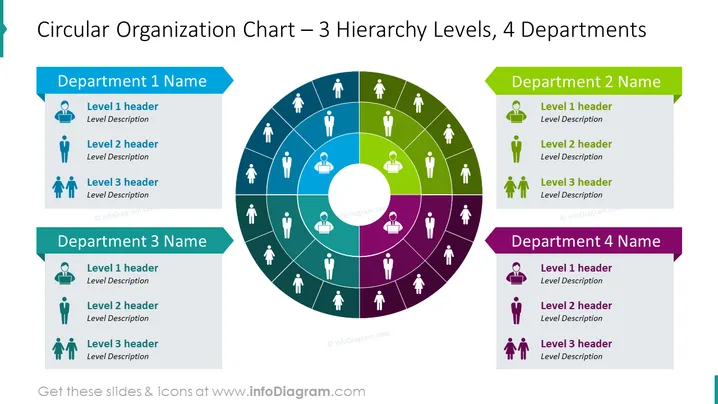
Circular Organization Chart – 3 Hierarchy Levels, 4 Departments
Slide Content
The slide presents a circular organizational chart that depicts 3 hierarchical levels within 4 distinct departments, each denoted by a different color. The departments are labeled as "Department 1 Name," "Department 2 Name," "Department 3 Name," and "Department 4 Name," corresponding to four-color coded segments (blue, green, teal, and purple) surrounding a central circular hub. Each department segment shows three levels: "Level 1 header," "Level 2 header," and "Level 3 header," with placeholders for level descriptions indicating a hierarchy from top to bottom levels.
Graphical Look
- The central feature is a large circular chart divided into four differently colored segments.
- Each segment represents a department and is shaded in a distinct color: blue, green, teal, or purple.
- In the central circle, there's a white circle that creates a donut-shaped diagram.
- Each departmental segment contains icons of a person with lines connecting to individual roles, visualizing the hierarchical structure.
- Color-coded banners are positioned adjacent to each department's segment, displaying the department's name.
- Within each department's segment, there are three smaller icons paired with text boxes for headers and descriptions.
The slide is colorful and uses both icons and text to create a visual hierarchy. The design is clean and professional, with a clear focus on delineating levels of responsibility and departmental divisions.
Use Cases
- Illustrating the structure of an organization during an internal company presentation.
- Displaying reporting relationships and departmental organization in a new employee orientation.
- Visualizing teams and hierarchies in proposals for organizational restructuring.
- Using it as part of a pitch to investors to explain company management and operational division.
How to Edit
How to edit text & colors

How to expand / shorten diagram

How to Replace Icons in infoDiagram PPT


