
Reviews
Sus gráficos añaden un toque agradable a mis presentaciones y recientemente los usé para una de mis reuniones generales. Su conjunto de herramientas añade profesionalismo a mis diapositivas. En lugar de usar imágenes prediseñadas estándar.
Necesitaba un aspecto fresco para algunas de mis diapositivas. Había intentado encontrar una forma de crear un efecto de pincel, de subrayar, acentuar, añadir algo de color y los marcadores escritos a mano fueron justo lo que necesitaba. Muy fácil de usar, fácil de ajustar el tamaño, cambiar el color. Fue una solución asequible y perfecta, y estoy feliz de recomendarla.
El aspecto nítido y limpio de los gráficos, y el hecho de que me permitiera editar y cambiar fácilmente los colores para que coincidieran con la plantilla fue mi principal razón para comprarlos.
Description
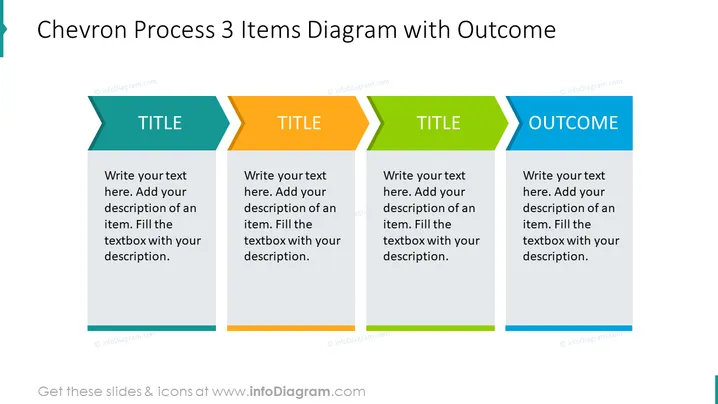
Chevron Process 3 Items Diagram with Outcome
Slide Content
The slide is designed to present a process or sequence divided into three key items, each leading to a defined outcome. Each chevron-shaped segment represents a step in the process, with space for a title and a detailed text description underneath. This format is particularly useful for streamlining complex workflows into bite-sized, understandable parts. The final segment indicates the result or conclusion of the preceding steps, emphasizing the actionable result or takeaway from the process.
Graphical Look
- The slide background is plain white, providing a clean and minimalistic feel.
- There are four main content areas, comprised of three chevron shapes aligned horizontally and a final rectangular shape for the outcome.
- Each chevron has a distinct color gradient border at the top, with colors transitioning from teal, to orange, and then green.
- The word "TITLE" is placed in bold within the colored gradient portion of each chevron, potentially indicating a space for a specific step title or subject.
- Beneath each "TITLE" space, there is a grey rectangular area designated for text input, offering ample space for detailed information or descriptions.
- The chevrons are interconnected with arrow shapes that intrude into each segment, visually guiding the viewer through the process flow from left to right.
- The final rectangular content area on the right has a blue gradient border at the top with the word "OUTCOME" in bold, signifying the conclusion or result of the process depicted.
The overall look of the slide is professional, with a focus on clarity and order. The use of gradients and defined shapes creates a sense of progression and continuity.
Use Cases
- Outlining step-by-step procedures or workflows in project management presentations.
- Demonstrating stages of product development or service delivery in business strategy meetings.
- Visualizing the phases of a marketing campaign, from planning to execution and evaluation, in a marketing presentation.
- Summarizing key milestones and expected results for a project during a stakeholder update or progress report.
How to Edit
How to edit text & colors

How to expand / shorten diagram

How to Replace Icons in infoDiagram PPT


