
Reviews
Sus gráficos añaden un toque agradable a mis presentaciones y recientemente los usé para una de mis reuniones generales. Su conjunto de herramientas añade profesionalismo a mis diapositivas. En lugar de usar imágenes prediseñadas estándar.
Necesitaba un aspecto fresco para algunas de mis diapositivas. Había intentado encontrar una forma de crear un efecto de pincel, de subrayar, acentuar, añadir algo de color y los marcadores escritos a mano fueron justo lo que necesitaba. Muy fácil de usar, fácil de ajustar el tamaño, cambiar el color. Fue una solución asequible y perfecta, y estoy feliz de recomendarla.
El aspecto nítido y limpio de los gráficos, y el hecho de que me permitiera editar y cambiar fácilmente los colores para que coincidieran con la plantilla fue mi principal razón para comprarlos.
Description
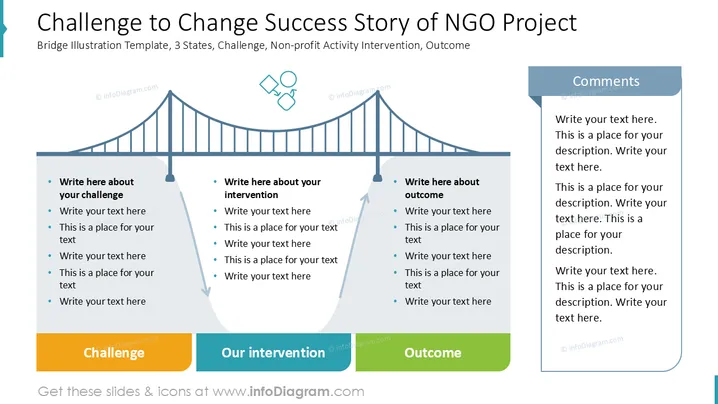
Challenge to Change Success Story of NGO Project
Slide Content
This slide outlines the success story of an NGO project through a bridge metaphor. It highlights the challenge, depicting initial obstacles faced by the NGO. It then describes intervention, detailing strategies undertaken to address these challenges. Finally, it illustrates the outcome, showcasing results and impacts following the intervention. Additionally, a comments section offers space for detailed explanations and reflections on each aspect.
Graphical Look
- The slide prominently features a bridge illustration, symbolizing connection and transition.
- Three sections are positioned below the bridge: "Challenge," "Our intervention," and "Outcome," each with placeholders for detailed text.
- An aqua blue and green color palette is used for clarity and differentiation among sections.
- The bridge graphic contains vertical lines and curves, providing a smooth and cohesive visual flow.
- The right side includes a comments section in a blue-shaded box for added insights.
- Small, abstract icons are presented near the center bridge pillar, adding visual interest.
The slide combines graphical elements like a bridge and arrow to effectively illustrate project phases. Its structured layout aids in conveying complex information clearly.
Use Cases
- Presenting a case study in a strategic NGO success meeting.
- Illustrating a project lifecycle during a nonprofit management workshop.
- Showcasing community engagement outcomes in a donor presentation.
- Training NGO staff about effective intervention strategies through visual storytelling.
How to Edit
How to edit text & colors

How to expand / shorten diagram

How to Replace Icons in infoDiagram PPT


