
Reviews
Sus gráficos añaden un toque agradable a mis presentaciones y recientemente los usé para una de mis reuniones generales. Su conjunto de herramientas añade profesionalismo a mis diapositivas. En lugar de usar imágenes prediseñadas estándar.
Necesitaba un aspecto fresco para algunas de mis diapositivas. Había intentado encontrar una forma de crear un efecto de pincel, de subrayar, acentuar, añadir algo de color y los marcadores escritos a mano fueron justo lo que necesitaba. Muy fácil de usar, fácil de ajustar el tamaño, cambiar el color. Fue una solución asequible y perfecta, y estoy feliz de recomendarla.
El aspecto nítido y limpio de los gráficos, y el hecho de que me permitiera editar y cambiar fácilmente los colores para que coincidieran con la plantilla fue mi principal razón para comprarlos.
Description
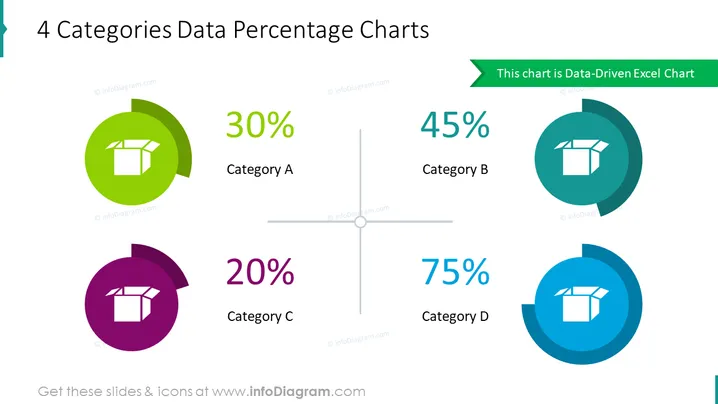
4 Categories Data Percentage Charts
Slide Content
This PowerPoint slide represents percentage values for four distinct categories—A, B, C, and D—with varying proportions. Category A is associated with 30%, suggesting a modest but significant portion. Category B, at 45%, indicates it holds a major share. Category C has the smallest slice at 20%, which may reflect a minor segment or area of low focus. Finally, Category D dominates with a 75% share, highlighting it as the most substantial or prioritized category.
Graphical Look
- The slide has a clean white background with a central cross-axis.
- Four circular doughnut charts are placed towards the corners, each representing a category with its corresponding percentage.
- Each chart has a distinct color—green for Category A, darker teal for Category B, purple for Category C, and blue for Category D.
- A white icon of a box is placed in the middle of each doughnut chart, maintaining a consistent visual theme.
- The percentage values are prominently displayed in a large font, making the data immediately clear.
- Beside each percentage, the category label is displayed in a matching color to its respective chart.
- A green ribbon at the top right contains the text "This chart is Data-Driven Excel Chart," which emphasizes the data's source.
The overall look of the slide is modern and visually pleasing, with a good use of color to differentiate between categories. The use of doughnut charts with centered icons provides a simple yet effective way to visualize data proportions.
Use Cases
- Presenting market share distribution among different product categories in a business sales presentation.
- Illustrating the breakdown of budget allocations across different departments in a financial report.
- Showcasing the percentage of resources allocated to various projects in a project management update.
- Communicating customer segmentation or demographic data in a marketing strategy meeting.
How to Edit
How to edit text & colors

How to expand / shorten diagram

How to Replace Icons in infoDiagram PPT


