
Reviews
Ihre Grafiken verleihen meinen Präsentationen eine nette Note, und ich habe sie kürzlich für eines meiner All-Hands-Meetings verwendet. Ihre Toolbox verleiht meinen Folien Professionalität, anstatt Standard-Clipart zu verwenden.
Ich brauchte einen neuen Blick auf einige meiner Folien. Ich habe versucht, einen Weg zu finden, einen Pinselschlag-Effekt zu erzielen, um zu unterstreichen, hervorzuheben, Farbe hinzuzufügen, und die handgeschriebenen Markierungen waren genau das Richtige. Sehr einfach zu bedienen, leicht in der Größe zu ändern, die Farbe zu ändern. Es war eine erschwingliche, perfekte Lösung und ich empfehle sie gerne weiter.
Die klare, saubere Optik der Grafiken und die Tatsache, dass ich die Farben leicht bearbeiten und an die Vorlage anpassen konnte, war mein Hauptgrund für den Kauf.
Description
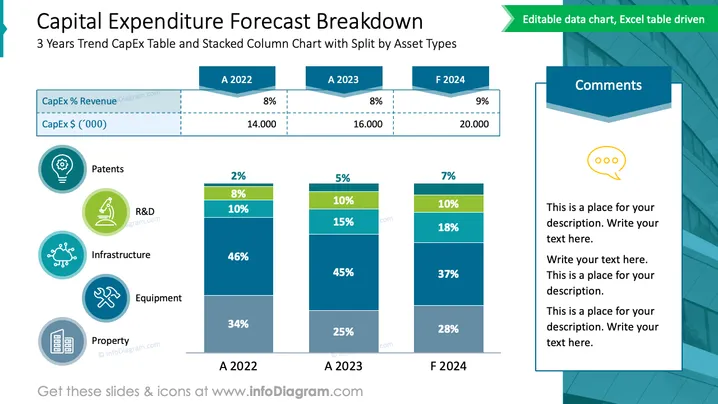
Capital Expenditure Forecast Breakdown
Slide Content
The slide presents a 3-year trend of Capital Expenditure (CapEx) with a stacked column chart breaking down expenses by asset types such as Patents, R&D, Infrastructure, Equipment, and Property. Percentages of revenue and total CapEx values in thousands are indicated for each year, showing a slight increase in spending forecasted for F 2024. The left side enumerates the different asset types with associated icons. A "Comments" section on the right suggests where additional context or explanations might be inserted.
Graphical Look
- The slide's background is white, contributing to a clean and professional look.
- The slide title is displayed in large, dark blue text at the top, contrasting nicely with the background.
- There is a 3-column stacked bar chart with 5 different colors representing various asset types.
- Each bar in the chart represents a different year, with "A" for actual past years and "F" for a forecasted year.
- Color codes and percentages are displayed within each bar segment, providing quick visual data interpretation.
- On the left, there are five circular icons, each corresponding to an asset type on the bar chart, with a blue and white color scheme.
- There is a speech bubble-shaped area on the right, titled "Comments," with placeholder text inside.
- The slide's header also includes a small green banner highlighting that the chart is data editable and driven by an Excel table.
The slide has a balanced composition, with graphical elements and text boxes evenly spaced out. The cool color palette gives it a corporate and analytical feel, and the mix of icons and charts facilitates an engaging data presentation.
Use Cases
- This slide can be used in financial planning presentations to showcase projected capital investments.
- It can serve as part of a business report presented to stakeholders that details where funds are allocated.
- It is suitable for budget approval meetings where decision-makers can discuss and reference expenditure across different sectors of a business.
- The slide can be used in educational settings or workshops to explain how to break down and analyze CapEx trends visually.
How to Edit
How to edit text & colors

How to expand / shorten diagram

How to Replace Icons in infoDiagram PPT


