

Your graphics add a nice touch to my presentations and I recently used them for one of my all-hands meetings. Your toolbox adds professionalism to my slides. Instead of using standard clipart.
Claude Jones, Director of Engineer, @Walmartlabs, USA

Your graphics add a nice touch to my presentations and I recently used them for one of my all-hands meetings. Your toolbox adds professionalism to my slides. Instead of using standard clipart.
Claude Jones, Director of Engineer, @Walmartlabs, USA
I needed a fresh look at some of my slides. I've tried to find a way to create a paintbrush effect, to underline, accentuate, add some color and the handwritten markers were just the things. Very easy to use, easy to size, change the color. It was an affordable, perfect solution and I'm happy to recommend it.
Anonymous, US
The crisp, clean look of the graphics, and the fact that it allowed me to easily edit and change the colors to match the template was my main reason for purchasing them.
Brandie Jenkins, E-learning Developer, USA
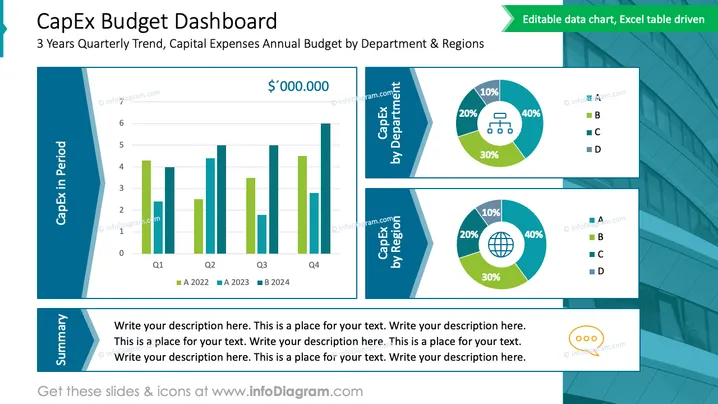
This PowerPoint slide is titled "CapEx Budget Dashboard" and showcases a 3 Year Quarterly Trend and Capital Expenses Annual Budget by Department & Regions. The slide is structured into three sections: a bar chart illustrating capital expenditures (CapEx) over four quarters of two different years, and two donut charts breaking down expenses by department and by region. Each section is labeled clearly, and the donut charts feature percentage breakdowns for four categories, referred to as A, B, C, and D, enabling the viewer to quickly assess the distribution of CapEx.
The slide has a clean and professional layout with a good balance of text, charts, and aesthetic design elements. The contrasting shades of blue and green add visual interest and assist in distinguishing various data points.



