
Reviews
Sus gráficos añaden un toque agradable a mis presentaciones y recientemente los usé para una de mis reuniones generales. Su conjunto de herramientas añade profesionalismo a mis diapositivas. En lugar de usar imágenes prediseñadas estándar.
Necesitaba un aspecto fresco para algunas de mis diapositivas. Había intentado encontrar una forma de crear un efecto de pincel, de subrayar, acentuar, añadir algo de color y los marcadores escritos a mano fueron justo lo que necesitaba. Muy fácil de usar, fácil de ajustar el tamaño, cambiar el color. Fue una solución asequible y perfecta, y estoy feliz de recomendarla.
El aspecto nítido y limpio de los gráficos, y el hecho de que me permitiera editar y cambiar fácilmente los colores para que coincidieran con la plantilla fue mi principal razón para comprarlos.
Description
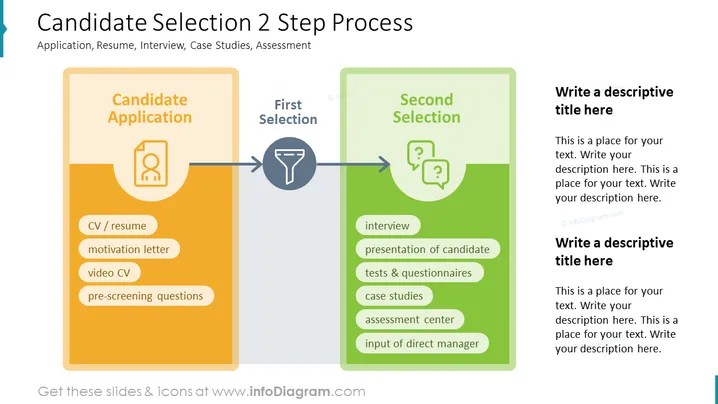
##Slide contents: The Candidate Selection process is divided into two steps: first selection and second selection. This PowerPoint Template consists of the candidate's application, first selection, and second selection. The candidate's application consists of a CV or Resume, motivation letter, video CV, and pre-screening questions. After the application process is done, the first selection of qualified candidates is made. The second selection consists of the interview process, a presentation of the applicant, tests and questionnaires, case studies, an assessment center, and input from the direct manager. You can use this slide if you are a hiring manager who wants to hire the best talent in the recruitment process. You can also use this slide if you are an HR manager who wants to explain your company's hiring process to your team. This will simplify your hiring decision and will ensure that you recruit the best candidates for your company. You can download this template on Google Slides and Keynote. ##Slide Infographic Description: White Background, Text Box, CV Icon, Resume Icon, Funnel Icon, Filtering Icon, Question Mark Bubbles Icon, Interview Icon, Test Icon
How to Edit
How to edit text & colors

How to expand / shorten diagram

How to Replace Icons in infoDiagram PPT


