

Your graphics add a nice touch to my presentations and I recently used them for one of my all-hands meetings. Your toolbox adds professionalism to my slides. Instead of using standard clipart.
Claude Jones, Director of Engineer, @Walmartlabs, USA

Your graphics add a nice touch to my presentations and I recently used them for one of my all-hands meetings. Your toolbox adds professionalism to my slides. Instead of using standard clipart.
Claude Jones, Director of Engineer, @Walmartlabs, USA
I needed a fresh look at some of my slides. I've tried to find a way to create a paintbrush effect, to underline, accentuate, add some color and the handwritten markers were just the things. Very easy to use, easy to size, change the color. It was an affordable, perfect solution and I'm happy to recommend it.
Anonymous, US
The crisp, clean look of the graphics, and the fact that it allowed me to easily edit and change the colors to match the template was my main reason for purchasing them.
Brandie Jenkins, E-learning Developer, USA
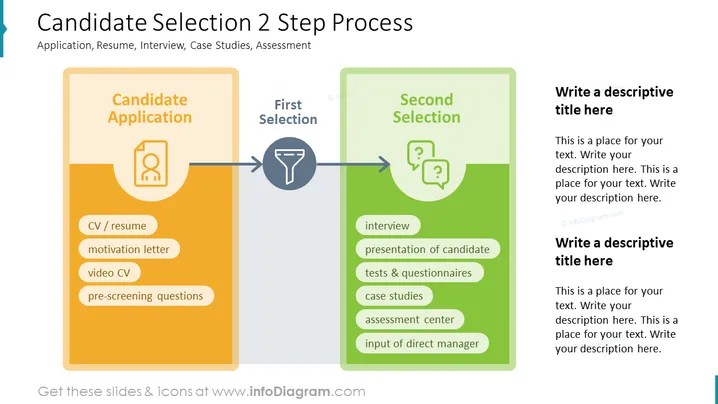
##Slide contents: The Candidate Selection process is divided into two steps: first selection and second selection. This PowerPoint Template consists of the candidate's application, first selection, and second selection. The candidate's application consists of a CV or Resume, motivation letter, video CV, and pre-screening questions. After the application process is done, the first selection of qualified candidates is made. The second selection consists of the interview process, a presentation of the applicant, tests and questionnaires, case studies, an assessment center, and input from the direct manager. You can use this slide if you are a hiring manager who wants to hire the best talent in the recruitment process. You can also use this slide if you are an HR manager who wants to explain your company's hiring process to your team. This will simplify your hiring decision and will ensure that you recruit the best candidates for your company. You can download this template on Google Slides and Keynote. ##Slide Infographic Description: White Background, Text Box, CV Icon, Resume Icon, Funnel Icon, Filtering Icon, Question Mark Bubbles Icon, Interview Icon, Test Icon



