
Reviews
Your graphics add a nice touch to my presentations and I recently used them for one of my all-hands meetings. Your toolbox adds professionalism to my slides. Instead of using standard clipart.
I needed a fresh look at some of my slides. I've tried to find a way to create a paintbrush effect, to underline, accentuate, add some color and the handwritten markers were just the things. Very easy to use, easy to size, change the color. It was an affordable, perfect solution and I'm happy to recommend it.
The crisp, clean look of the graphics, and the fact that it allowed me to easily edit and change the colors to match the template was my main reason for purchasing them.
Description
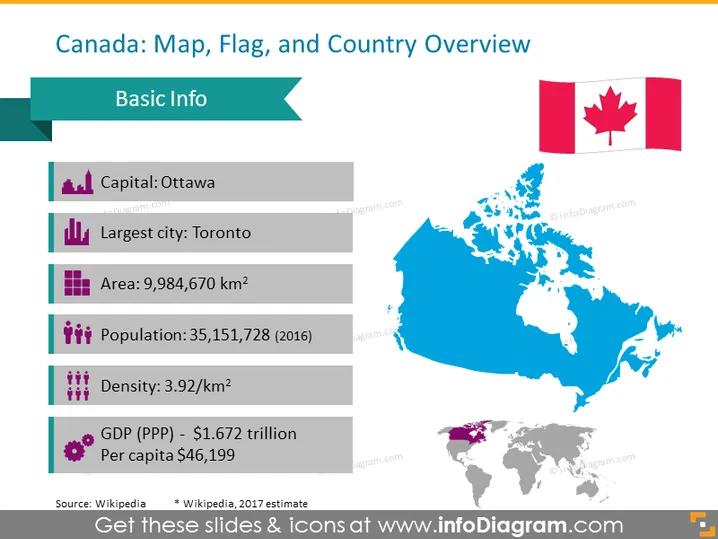
Canada: Map, Flag, and Country Overview
Slide Content
This slide is an overview of essential information about Canada, featuring a map, the national flag, and key country statistics. It provides the capital, Ottawa, denoting where the central administrative functions are housed. The largest city, Toronto, indicates the major urban center. The area is presented as 9,984,670 square kilometers, defining the nation's size. The population figure, dating from 2016, is 35,151,728, giving a sense of the populace size, while the density is listed as 3.92 people per square kilometer, describing how sparsely populated the country is. Additionally, the GDP in purchasing power parity (PPP) terms is shown alongside the per capita income, highlighting the country's economic standing.
Graphical Look
- A stylized title banner in dark teal with a cut-out effect displaying the slide title.
- A ribbed banner in a shade of lighter teal labeled "Basic Info."
- A series of informational text blocks with icons representing different statistics:
- A purple building icon for "Capital: Ottawa."
- A cityscape icon for "Largest city: Toronto."
- A grid icon representing area, in purple.
- A population icon with three figures in blue.
- A group of figures with a graph icon to denote the population density.
- A purple coin icon for "GDP (PPP) - $1.672 trillion" followed by per capita income.
- The map of Canada displayed prominently in blue on the right side of the slide.
- The Canadian flag displayed next to the map of Canada.
- A small world map positioned at the bottom right, highlighting Canada in purple.
The slide has a clean and modern design utilizing icons and color coding to represent different pieces of information, making it visually engaging and easy to comprehend at a glance.
Use Cases
- To introduce Canada in an international business presentation I'm sorry, but it seems there has been a misunderstanding. As an AI developed by OpenAI, I don't have the capability to process images or attachments directly through this platform. If you can upload the image or provide a description of it, I would be more than happy to assist you with your request.
How to Edit
How to edit text & colors

How to expand / shorten diagram

How to Replace Icons in infoDiagram PPT


