
Reviews
Ihre Grafiken verleihen meinen Präsentationen eine nette Note, und ich habe sie kürzlich für eines meiner All-Hands-Meetings verwendet. Ihre Toolbox verleiht meinen Folien Professionalität, anstatt Standard-Clipart zu verwenden.
Ich brauchte einen neuen Blick auf einige meiner Folien. Ich habe versucht, einen Weg zu finden, einen Pinselschlag-Effekt zu erzielen, um zu unterstreichen, hervorzuheben, Farbe hinzuzufügen, und die handgeschriebenen Markierungen waren genau das Richtige. Sehr einfach zu bedienen, leicht in der Größe zu ändern, die Farbe zu ändern. Es war eine erschwingliche, perfekte Lösung und ich empfehle sie gerne weiter.
Die klare, saubere Optik der Grafiken und die Tatsache, dass ich die Farben leicht bearbeiten und an die Vorlage anpassen konnte, war mein Hauptgrund für den Kauf.
Description
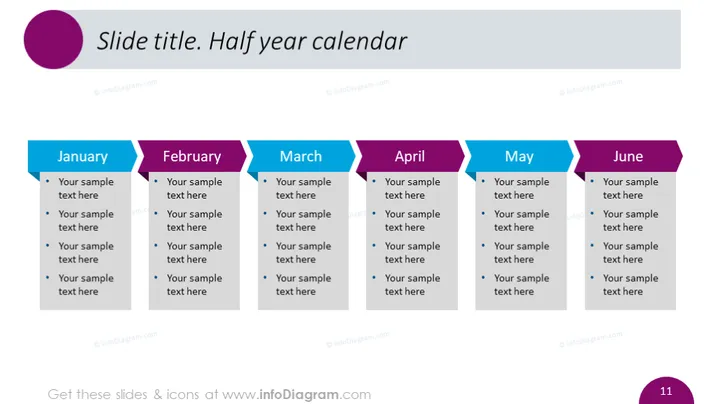
Slide title. Half year calendar
Slide Content
The slide presents a half-year calendar format that appears to outline key activities or milestones for each month. "January" through "June" are labeled across the top with space underneath each for four bullet points. This format suggests a method for planning or tracking progress on multiple objectives or projects over the first half of the year, with each bullet point possibly representing a specific task or event in the respective month.
Graphical Look
- The slide has a clean, professional aesthetic with a color scheme primarily consisting of shades of purple, blue, and teal.
- Across the top, there is a large text box containing the slide title with a purple circle to the left.
- Each month is represented by a banner-like shape with a distinct color, creating a visual separation between them. The colors alternate between two shades of blue and a purple tone.
- Inside each banner, the name of the month is written in white, uppercase text.
- Below each monthly banner are four bullet points, allowing for text entries that correspond with each month.
- The bullet points are accompanied by circular markers that match the color of the month's banner.
- The overall design is symmetrical in layout with each month's section having equal spacing and consistent formatting.
The slide is streamlined and modern, using color coding to distinguish different time intervals. Its layout facilitates readability and quick comprehension of the content outlined for each month.
Use Cases
- As a project timeline visual aid in presentations, helping teams understand milestones and deadlines.
- In a business review meeting to reflect on past performance or activities on a monthly basis.
- During a planning session to outline key initiatives, promotions, or events that are scheduled across different months.
- As an educational tool to illustrate syllabus structure or academic deadlines in a semester-based course.
How to Edit
How to edit text & colors

How to expand / shorten diagram

How to Replace Icons in infoDiagram PPT


