
Reviews
Ihre Grafiken verleihen meinen Präsentationen eine nette Note, und ich habe sie kürzlich für eines meiner All-Hands-Meetings verwendet. Ihre Toolbox verleiht meinen Folien Professionalität, anstatt Standard-Clipart zu verwenden.
Ich brauchte einen neuen Blick auf einige meiner Folien. Ich habe versucht, einen Weg zu finden, einen Pinselschlag-Effekt zu erzielen, um zu unterstreichen, hervorzuheben, Farbe hinzuzufügen, und die handgeschriebenen Markierungen waren genau das Richtige. Sehr einfach zu bedienen, leicht in der Größe zu ändern, die Farbe zu ändern. Es war eine erschwingliche, perfekte Lösung und ich empfehle sie gerne weiter.
Die klare, saubere Optik der Grafiken und die Tatsache, dass ich die Farben leicht bearbeiten und an die Vorlage anpassen konnte, war mein Hauptgrund für den Kauf.
Description
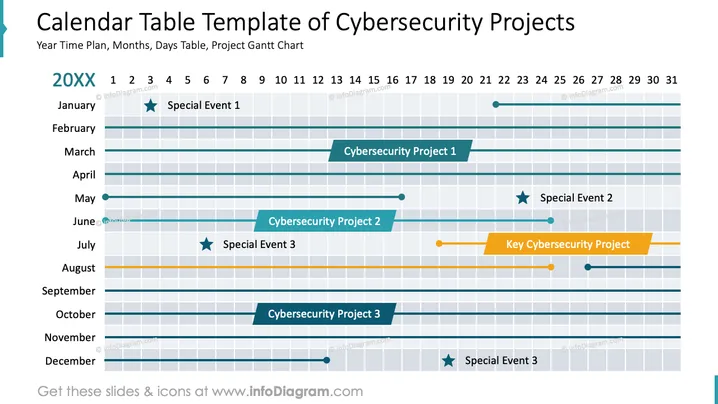
Calendar Table Template of Cybersecurity Projects
Slide Content
The slide presents a calendar table layout specifically designed for tracking cybersecurity projects and notable events for the year 20XX. It includes:
- Special Event 1: Marked with a star in January, indicating a noteworthy occurrence.
- Cybersecurity Project 1: A timeline running from January to July, showcasing progress.
- Cybersecurity Project 2: Highlighted from May to September, visualizing the project's span.
- Key Cybersecurity Project: Running through August, emphasized by a distinct color.
- Special Event 2: Scheduled in June with a star symbol, showing its significance.
- Special Event 3: Scheduled in July and December, marked by a star to highlight importance.
Graphical Look
- The slide features a structured grid layout resembling a Gantt chart.
- Horizontal lines represent each month from January to December, divided by vertical lines showing days 1 to 31.
- Each project is shown as a colored horizontal bar, with teal and orange indicating different projects.
- Special events are distinguished by star icons next to their descriptions.
- The slide has a light gray background, enhancing the visibility of the bars and icons.
- Day numbers are displayed in a linear fashion at the top, while month names are aligned vertically.
The overall design is clean and structured, with a clear distinction between different projects and events through colors and icons. This allows for easy tracking of project timelines and event scheduling.
Use Cases
- Project Management Meetings: Effective for tracking project progress and important deadlines.
- Executive Briefings: Useful for showcasing key project milestones and significant events.
- Annual Planning Sessions: Helps in visualizing the yearly timeline for projects and events.
- Cybersecurity Workshops: Ideal for planning and scheduling cybersecurity-related activities.
How to Edit
How to edit text & colors

How to expand / shorten diagram

How to Replace Icons in infoDiagram PPT


