

Your graphics add a nice touch to my presentations and I recently used them for one of my all-hands meetings. Your toolbox adds professionalism to my slides. Instead of using standard clipart.
Claude Jones, Director of Engineer, @Walmartlabs, USA

Your graphics add a nice touch to my presentations and I recently used them for one of my all-hands meetings. Your toolbox adds professionalism to my slides. Instead of using standard clipart.
Claude Jones, Director of Engineer, @Walmartlabs, USA
I needed a fresh look at some of my slides. I've tried to find a way to create a paintbrush effect, to underline, accentuate, add some color and the handwritten markers were just the things. Very easy to use, easy to size, change the color. It was an affordable, perfect solution and I'm happy to recommend it.
Anonymous, US
The crisp, clean look of the graphics, and the fact that it allowed me to easily edit and change the colors to match the template was my main reason for purchasing them.
Brandie Jenkins, E-learning Developer, USA
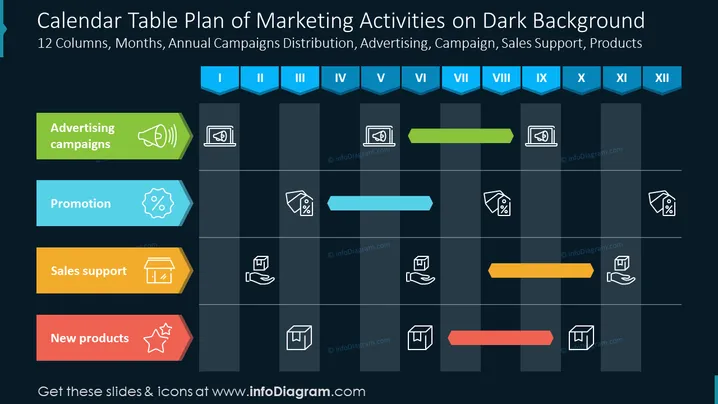
The PowerPoint slide titled "Calendar Table Plan of Marketing Activities on Dark Background" presents a 12-month schedule for marketing campaigns, promotions, sales support, and new product releases. Each category is represented by a different color and icon: Advertising campaigns (green with a megaphone icon) denote periods of active advertising; Promotion (blue with a tag icon) outlines planned promotional windows; Sales support (yellow with a briefcase icon) indicates times focused on supporting the sales force; New products (red with a star icon) represent planned product launches.
The slide's aesthetic is clean and professional, with a color palette designed to differentiate various marketing activities quickly. The use of icons and bars makes the information easily digestible, allowing for a quick overview of the annual marketing strategy.



