
Reviews
The icons are fantastic, easy to use, and will add value to any project or presentation. Keep up the great work.
I love how simple infoDiagram's solutions are and the personal interest they took in my work. Recommended 1000%!
The crisp, clean look of the graphics, and the fact that it allowed me to easily edit and change the colors to match the template was my main reason for purchasing them.
Description
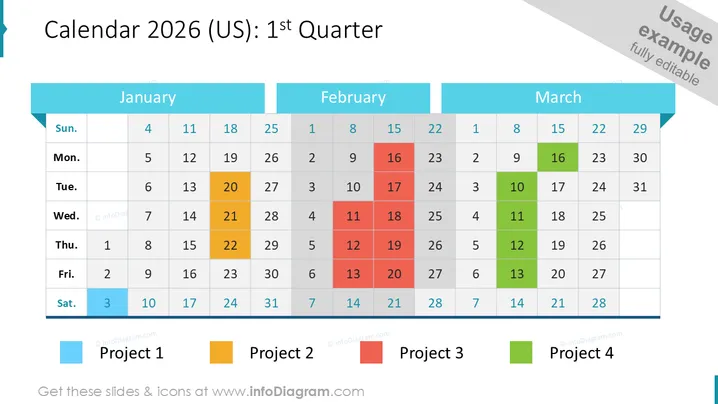
Calendar 2026 (US): 1st Quarter
Slide Content
The slide presents a calendar for the first quarter of 2026 with January, February, and March months shown. Specific dates across the three months are highlighted to mark the timelines of four distinct projects. Project 1 is indicated by a blue square, Project 2 by an orange rectangle, Project 3 by a black rectangle, and Project 4 by a green rectangle. This visual designation helps easily track and identify the span and overlap of project timelines.
Graphical Look
- The slide background is a photographic image that depicts a person's hand holding a pen over a notebook, suggesting a business or planning theme.
- The calendar is presented in a grid format with three columns, each representing a month, and rows for weeks.
- Each month has a heading with the month name against an opaque teal-colored background strip.
- Dates are displayed in white text on transparent cells, layered over the photo background, allowing for the background image to be faintly visible.
- Highlighted dates for projects are shown with colored blocks in blue, orange, black, and green.
- At the bottom left corner, there are four legend indicators, each with a color block and a corresponding project name next to it.
- The overall composition has a clean, modern aesthetic with a professional tone.
The slide presents a polished and business-oriented design language, effectively combining a photographic background with a calendar overlay to provide a visual project timeline. The color-coded highlights and the transparency of various elements create a depth of field while maintaining readability.
Use Cases
- Planning and illustrating project timelines during a business meeting or strategy session.
- Presenting quarterly goals and deadlines to team members or stakeholders for alignment.
- Visualizing resource allocation or milestone tracking across multiple projects for management.
- Incorporating into business or project management presentations for illustrating time-sensitive action plans.
How to Edit
How to edit text & colors

How to expand / shorten diagram

How to Replace Icons in infoDiagram PPT


