
Reviews
Your slides are my 'secret sauce' when it comes to visualising my ideas to clients. I'm saving so much time.
InfoDiagram has been a wonderful resource since I found the product site a few years ago.
Your slides often generate good comments and ideas from my team that improve the final slides.
Description
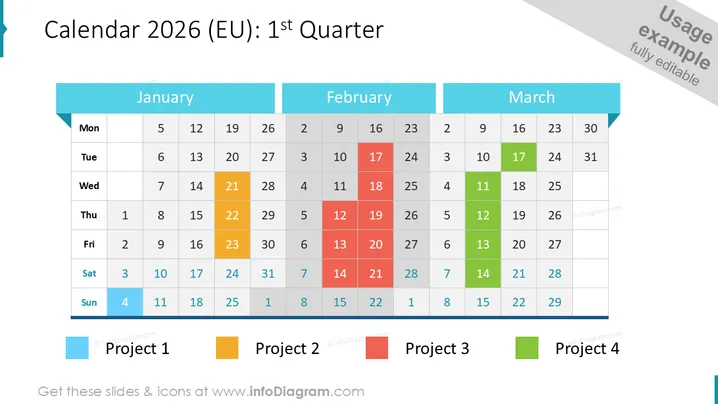
Calendar 2026 (EU): 1st Quarter
Slide Content
The slide is a visual representation of the Calendar for the first quarter of 2025, specific to the European region. It showcases the months January, February, and March laid out in a traditional grid structure. Each month is color-coded to highlight different days associated with four distinct projects. For instance, Project 1 is highlighted in blue, Project 2 in yellow, Project 3 in red, and Project 4 in green. This color coding provides a clear visual differentiation between the days dedicated to different projects.
Graphical Look
- The slide background is white, creating a clean and unobtrusive backdrop for the content.
- At the top, there's a dominant header in dark blue with the title "Calendar 2025 (EU): 1st Quarter" written in white font.
- Each month (January, February, March) has its own sub-header, which is a lighter shade of blue than the main title, making it distinct yet coherent.
- The calendar days are laid out in neat, aligned tables with rows for each week and columns for days of the week.
- Colored squares represent individual days, with color signifying the association with different projects.
- Below the calendar, there are color legends: blue, yellow, red, and green squares followed by the labels "Project 1," "Project 2," "Project 3," and "Project 4," respectively.
- The design is minimalistic, with a strong use of color for functional rather than decorative purposes.
The slide has a professional and straightforward aesthetic, with a strong emphasis on clarity and organization through the use of color coding. The layout is grid-based, symmetric, and spacious, which contributes to a sense of order and readability.
Use Cases
- Planning and illustrating project timelines during business strategy meetings.
- Tracking milestones and deadlines in a visual format for team or project management presentations.
- Brief ing all project members during internal updates or review sessions on how different projects align within the quarterly schedule.
- Utilizing as a slide in webinars or workshops to teach time management or project planning in a business context.
How to Edit
How to edit text & colors

How to expand / shorten diagram

How to Replace Icons in infoDiagram PPT


