
Reviews
Your graphics add a nice touch to my presentations and I recently used them for one of my all-hands meetings. Your toolbox adds professionalism to my slides. Instead of using standard clipart.
I needed a fresh look at some of my slides. I've tried to find a way to create a paintbrush effect, to underline, accentuate, add some color and the handwritten markers were just the things. Very easy to use, easy to size, change the color. It was an affordable, perfect solution and I'm happy to recommend it.
The crisp, clean look of the graphics, and the fact that it allowed me to easily edit and change the colors to match the template was my main reason for purchasing them.
Description
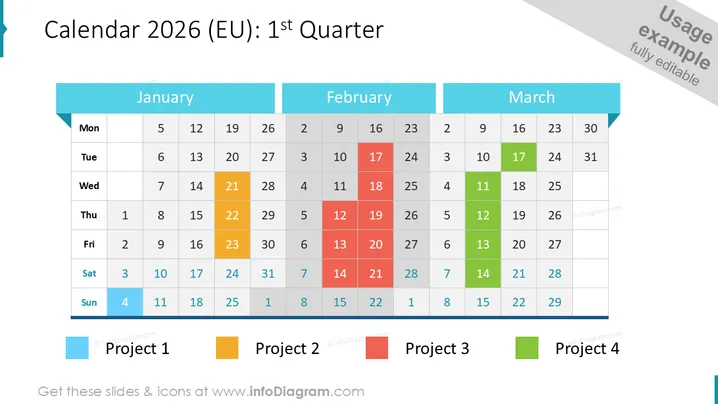
Calendar 2026 (EU): 1st Quarter
Slide Content
This slide is a visual representation of the 2025 calendar for the first quarter, specifically for the European Union (EU). It features three columns, each representing a month: January, February, and March. Days of the week are listed horizontally from Monday to Sunday, creating a grid for each month with dates filled in. Certain dates are highlighted in different colors, presumably to indicate specific events, deadlines, or important occurrences within those months. The slide serves as a useful tool for planning, scheduling, and tracking key dates over a quarter.
Graphical Look
The slide has a professional and clean design. The following points describe the graphical look:
- A dark overlay at the bottom featuring four colored squares and rectangles serving as markers or legends.
- Three large title boxes with a light blue background at the top, labeling each of the months: January, February, and March.
- A grid structure under each month title displaying the days of the week at the top and corresponding dates below.
- Specific dates on the calendars are highlighted in colors such as blue, green, yellow, orange, and red to possibly denote different events or activities.
- A background image is partially visible, displaying a desk setting with a notebook, pen, and cup of coffee, contributing to a business or planning theme.
- Consistent use of transparent black cells for non-active days in the grid to indicate the transition between months.
The overall look of the slide is sharp and focused, with vibrant highlights drawing attention to specific dates. It is designed to be easily understandable at a glance.
Use Cases
- Planning and projecting company milestones and deadlines for the first quarter of a given year.
- Presenting quarterly business reviews that outline past and upcoming activities.
- Scheduling team assignments and project timelines in a corporate setting.
- Communicating holiday periods, company event dates, or staff vacations during a presentation to management or a broader team.
How to Edit
How to edit text & colors

How to expand / shorten diagram

How to Replace Icons in infoDiagram PPT


