

Your graphics add a nice touch to my presentations and I recently used them for one of my all-hands meetings. Your toolbox adds professionalism to my slides. Instead of using standard clipart.
Claude Jones, Director of Engineer, @Walmartlabs, USA

Your graphics add a nice touch to my presentations and I recently used them for one of my all-hands meetings. Your toolbox adds professionalism to my slides. Instead of using standard clipart.
Claude Jones, Director of Engineer, @Walmartlabs, USA
I needed a fresh look at some of my slides. I've tried to find a way to create a paintbrush effect, to underline, accentuate, add some color and the handwritten markers were just the things. Very easy to use, easy to size, change the color. It was an affordable, perfect solution and I'm happy to recommend it.
Anonymous, US
The crisp, clean look of the graphics, and the fact that it allowed me to easily edit and change the colors to match the template was my main reason for purchasing them.
Brandie Jenkins, E-learning Developer, USA
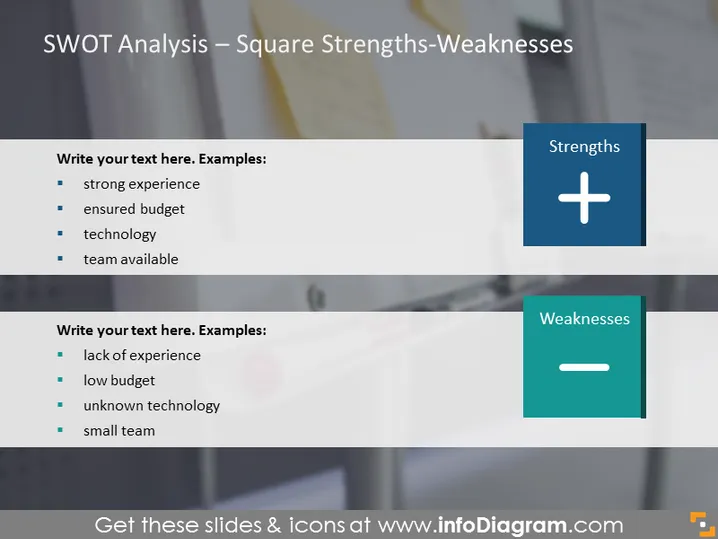
This PowerPoint slide presents a simplified version of a SWOT analysis focused on Strengths and Weaknesses. Each section provides a placeholder for the audience to add text. For Strengths, examples given are a strong experience, ensured budget, technology, and team availability. Strong experience means the advantage of having skilled expertise, ensured budget signifies financial readiness, technology implies advanced tools and systems, and team availability refers to having personnel resources. Weaknesses are exemplified by a lack of experience, low budget, unknown technology, and a small team. Lack of experience indicates deficits in skills or expertise, low budget points to financial constraints, unknown technology suggests a gap in technical capabilities, and a small team implies limited human resources.
The slide has a clear, professional look with a focus on contrasting the positive and negative aspects in a visually distinct manner.



