

Your graphics add a nice touch to my presentations and I recently used them for one of my all-hands meetings. Your toolbox adds professionalism to my slides. Instead of using standard clipart.
Claude Jones, Director of Engineer, @Walmartlabs, USA

Your graphics add a nice touch to my presentations and I recently used them for one of my all-hands meetings. Your toolbox adds professionalism to my slides. Instead of using standard clipart.
Claude Jones, Director of Engineer, @Walmartlabs, USA
I needed a fresh look at some of my slides. I've tried to find a way to create a paintbrush effect, to underline, accentuate, add some color and the handwritten markers were just the things. Very easy to use, easy to size, change the color. It was an affordable, perfect solution and I'm happy to recommend it.
Anonymous, US
The crisp, clean look of the graphics, and the fact that it allowed me to easily edit and change the colors to match the template was my main reason for purchasing them.
Brandie Jenkins, E-learning Developer, USA
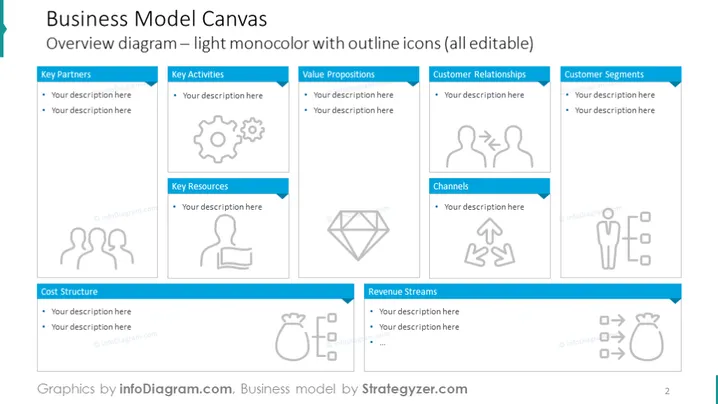
The slide presents a Business Model Canvas, a strategic management template for developing new or documenting existing business models. It's divided into nine segments: Key Partners (who help make the business work), Key Activities (what the company does to deliver value), Value Propositions (the products or services that create value for customers), Customer Relationships (how the company interacts with customers), Customer Segments (the different groups of people or organizations the business aims to reach), Channels (how the company communicates with and reaches its customer segments), Revenue Streams (the company's income from value propositions), Cost Structure (the costs involved in operating the business), and Key Resources (the most important assets required to make the business model work).
The slide has a clean, professional design with a consistent use of icons and color to visually separate different sections. The layout is balanced and easy to follow, inviting users to fill in details for each part of the business model.



