

Your graphics add a nice touch to my presentations and I recently used them for one of my all-hands meetings. Your toolbox adds professionalism to my slides. Instead of using standard clipart.
Claude Jones, Director of Engineer, @Walmartlabs, USA

Your graphics add a nice touch to my presentations and I recently used them for one of my all-hands meetings. Your toolbox adds professionalism to my slides. Instead of using standard clipart.
Claude Jones, Director of Engineer, @Walmartlabs, USA
I needed a fresh look at some of my slides. I've tried to find a way to create a paintbrush effect, to underline, accentuate, add some color and the handwritten markers were just the things. Very easy to use, easy to size, change the color. It was an affordable, perfect solution and I'm happy to recommend it.
Anonymous, US
The crisp, clean look of the graphics, and the fact that it allowed me to easily edit and change the colors to match the template was my main reason for purchasing them.
Brandie Jenkins, E-learning Developer, USA
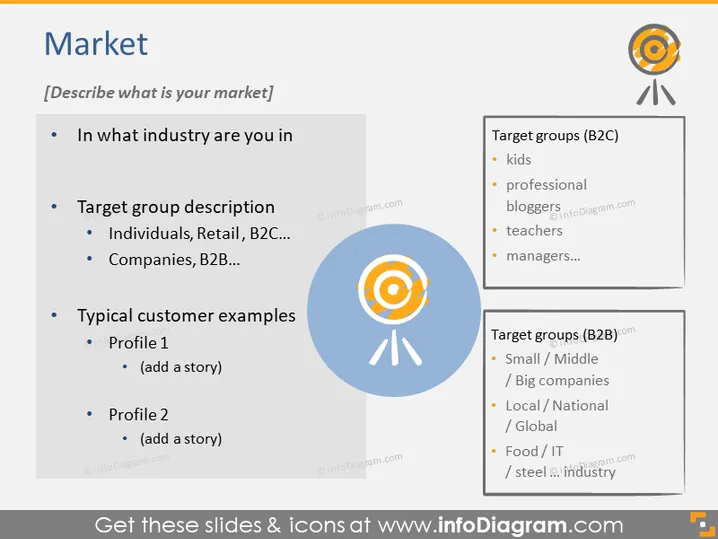
The PowerPoint slide titled "Market" prompts the presenter to describe their market sphere. It asks questions such as "In what industry are you in" to identify the industry sector. "Target group description" explores who the customers might be, with subpoints like "Individuals, Retail, B2C..." clarifying that these targets could be everyday consumers or other businesses like "Companies, B2B...". "Typical customer examples" encourages the presentation of customer profiles and suggests adding narrative—"add a story"—to provide context or specific examples. The right side of the slide lists potential "Target groups (B2C)" such as kids and teachers, and "Target groups (B2B)" such as "Small / Middle / Big companies".
The slide's overall look is modern and business-oriented with a graphical element that visually reinforces the concept of market targeting. The color scheme is subtle, with blue and gray tones complementing the content.



