
Reviews
Sus gráficos añaden un toque agradable a mis presentaciones y recientemente los usé para una de mis reuniones generales. Su conjunto de herramientas añade profesionalismo a mis diapositivas. En lugar de usar imágenes prediseñadas estándar.
Necesitaba un aspecto fresco para algunas de mis diapositivas. Había intentado encontrar una forma de crear un efecto de pincel, de subrayar, acentuar, añadir algo de color y los marcadores escritos a mano fueron justo lo que necesitaba. Muy fácil de usar, fácil de ajustar el tamaño, cambiar el color. Fue una solución asequible y perfecta, y estoy feliz de recomendarla.
El aspecto nítido y limpio de los gráficos, y el hecho de que me permitiera editar y cambiar fácilmente los colores para que coincidieran con la plantilla fue mi principal razón para comprarlos.
Description
Slide Title
Your sample text
Slide Content
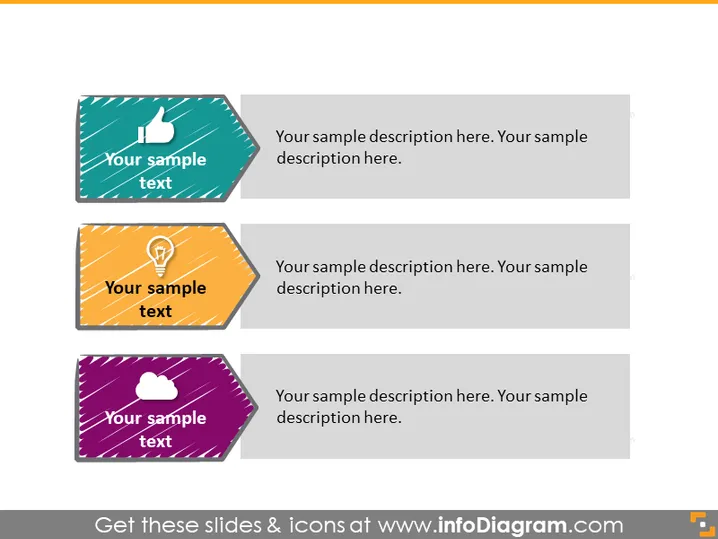
The PowerPoint slide is designed to showcase three key ideas or concepts, each accompanied by a symbolic icon. The first item features a thumbs-up icon representing approval or success; the second displays a light bulb, symbolizing ideas or innovation; the third hosts a cloud, signifying connectivity or cloud computing. Each item is coupled with space for a detailed description, allowing the speaker to expand on how each concept is relevant to their presentation.
Graphical Look
- Three parallelogram-shaped text boxes, each with a unique color (teal, yellow, and purple) and a distinct icon.
- The icons include a thumbs-up, a light bulb, and a cloud, correlating with the text they accompany.
- Each text box has its title area aligned to the left with larger bold text and a smaller body text area for additional details.
- The title and detail text areas are set against a white background, providing contrast and emphasis.
- The icons are white, standing out against the colored background of the parallelograms.
- The slide has a clean, modern design with drop shadows adding depth to the text boxes.
The overall appearance of the slide is sleek and professional, with a clear division of space for text and visuals. The use of icons aids in quick comprehension of each concept presented.
Use Cases
- To outline key stages or components of a business strategy during a corporate presentation.
- For summarizing the core values or principles of a company in a visually engaging format.
- In educational seminars to highlight and explain important concepts or ideas to attendees.
- When pitching a new product or service, to draw attention to the unique selling points or benefits.
How to Edit
How to edit text & colors

How to expand / shorten diagram

How to Replace Icons in infoDiagram PPT


