
Reviews
Sus gráficos añaden un toque agradable a mis presentaciones y recientemente los usé para una de mis reuniones generales. Su conjunto de herramientas añade profesionalismo a mis diapositivas. En lugar de usar imágenes prediseñadas estándar.
Necesitaba un aspecto fresco para algunas de mis diapositivas. Había intentado encontrar una forma de crear un efecto de pincel, de subrayar, acentuar, añadir algo de color y los marcadores escritos a mano fueron justo lo que necesitaba. Muy fácil de usar, fácil de ajustar el tamaño, cambiar el color. Fue una solución asequible y perfecta, y estoy feliz de recomendarla.
El aspecto nítido y limpio de los gráficos, y el hecho de que me permitiera editar y cambiar fácilmente los colores para que coincidieran con la plantilla fue mi principal razón para comprarlos.
Description
Building Blocks Percentage Matrix Infographics Template
Slide Content
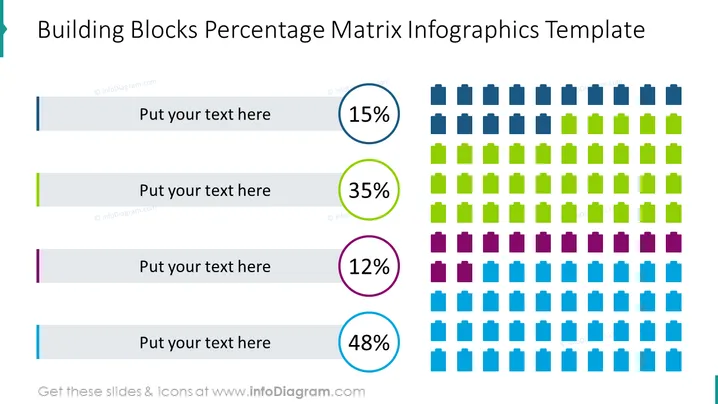
This PowerPoint slide titled "Building Blocks Percentage Matrix Infographics Template" is designed to depict varying percentages through a matrix of building block icons. There are four different percentages shown: 15%, 35%, 12%, and 48%. Each percentage is presented next to a corresponding color-coded area of block icons, with each block representing a smaller unit of the whole, allowing for a visual breakdown of data. The percentages might illustrate parts of a whole, such as departmental resource allocation, regional sales distribution, or project task completion status.
Graphical Look
- The slide title is at the top, in a large, bold font.
- Four horizontal sections, each with a distinct percentage and color, divide the slide.
- A circular percentage icon is presented in each section, with crisp, bold numbers and a thin outer circle to match the section's color.
- Blocks represent the percentage visually: dark blue for 15%, green for 35%, purple for 12%, and light blue for 48%.
- Each block is a small square with a simple three-dimensional effect, giving the appearance of depth.
- The slide has a plain white background, providing high contrast for the brightly colored percentage icons and blocks.
The slide is clean and modern, with a graphic emphasis on simplicity and readability. The color coding and block representations create an immediate visual association between the percentages and their graphical representation.
Use Cases
- Illustrating survey results or demographic data in a visual and easily understandable manner.
- Displaying company performance metrics across different regions or departments.
- Showing progress completion percentages for various project stages or milestones.
- Visualizing market share split among different products or services offered by a company.
How to Edit
How to edit text & colors

How to expand / shorten diagram

How to Replace Icons in infoDiagram PPT


