
Reviews
Ihre Grafiken verleihen meinen Präsentationen eine nette Note, und ich habe sie kürzlich für eines meiner All-Hands-Meetings verwendet. Ihre Toolbox verleiht meinen Folien Professionalität, anstatt Standard-Clipart zu verwenden.
Ich brauchte einen neuen Blick auf einige meiner Folien. Ich habe versucht, einen Weg zu finden, einen Pinselschlag-Effekt zu erzielen, um zu unterstreichen, hervorzuheben, Farbe hinzuzufügen, und die handgeschriebenen Markierungen waren genau das Richtige. Sehr einfach zu bedienen, leicht in der Größe zu ändern, die Farbe zu ändern. Es war eine erschwingliche, perfekte Lösung und ich empfehle sie gerne weiter.
Die klare, saubere Optik der Grafiken und die Tatsache, dass ich die Farben leicht bearbeiten und an die Vorlage anpassen konnte, war mein Hauptgrund für den Kauf.
Description
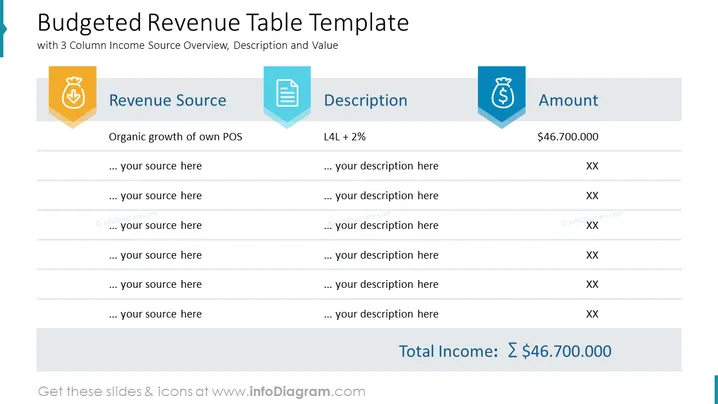
Budgeted Revenue Table Template
Slide Content
The slide is titled "Budgeted Revenue Table Template" and serves as a financial overview. It provides a three-column summary, listing different revenue sources along with a brief description and the corresponding amounts. The example given is "Organic growth of own POS" with a description "L4L + 2%" and an amount of "$46.700.000". Placeholder texts suggest where additional sources, descriptions, and amounts can be added. A total income figure at the bottom reflects the sum of individual amounts.
Graphical Look
- The slide has a clean and professional design with a white background.
- Three headers titled "Revenue Source," "Description," and "Amount" are accompanied by colorful icons: a bag of money, a document, and a dollar sign, respectively.
- The header for the "Revenue Source" is accentuated with an orange color, "Description" with blue, and "Amount" with a darker shade of blue.
- There is a well-structured table with horizontal rules separating the entries.
- The first row of the table has example content, while the subsequent rows contain placeholder text for additional entries.
- The placeholder texts for additional entries are denoted with an ellipsis followed by "your source here," "your description here," and "XX" for the amount.
- The bottom part of the slide highlights the "Total Income," which is written in bold and has a large summation symbol (Σ) next to the amount.
The slide uses geometric shapes such as rectangles for headings and horizontal rules for list separation. Color-coding aids in differentiating between the three categories of information.
Use Cases
- To present a company's expected revenue streams in a budget meeting or financial planning session.
- For startups when pitching to investors, to outline projected income sources and growth.
- During quarterly or annual financial reviews to summarize performance against revenue targets.
- In management summaries where visual representation simplifies complex financial data for stakeholders.
How to Edit
How to edit text & colors

How to expand / shorten diagram

How to Replace Icons in infoDiagram PPT


