
Reviews
Ihre Grafiken verleihen meinen Präsentationen eine nette Note, und ich habe sie kürzlich für eines meiner All-Hands-Meetings verwendet. Ihre Toolbox verleiht meinen Folien Professionalität, anstatt Standard-Clipart zu verwenden.
Ich brauchte einen neuen Blick auf einige meiner Folien. Ich habe versucht, einen Weg zu finden, einen Pinselschlag-Effekt zu erzielen, um zu unterstreichen, hervorzuheben, Farbe hinzuzufügen, und die handgeschriebenen Markierungen waren genau das Richtige. Sehr einfach zu bedienen, leicht in der Größe zu ändern, die Farbe zu ändern. Es war eine erschwingliche, perfekte Lösung und ich empfehle sie gerne weiter.
Die klare, saubere Optik der Grafiken und die Tatsache, dass ich die Farben leicht bearbeiten und an die Vorlage anpassen konnte, war mein Hauptgrund für den Kauf.
Description
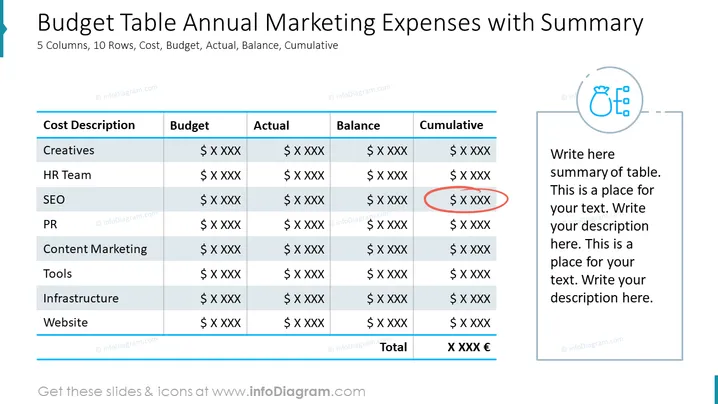
##Slide contents: The Marketing Expenses PPT Template can be used if you want to create a professional marketing budget PPT presentation. A budget plan is an important part of marketing, so it is important to set up a marketing plan that can cover the marketing costs of your campaigns. You can use this budget PowerPoint Template to manage your marketing expenses such as digital marketing campaigns, business campaigns, public relations, and advertising. This budget table is made up of 5 columns and 10 rows. The 5 columns include cost description, budget, actual, balance, and cumulative. The 10 rows consist of creatives, HR team, SEO, PR, content marketing, tools, infrastructure, and website. At the bottom of the table, you can write the total charge. This will help you compare your marketing fee to other costs in order to make sure you're not spending a lot of money. You can use this slide if you are a marketing manager who wants to present the annual marketing costs of each activity to your audience. It will help you display the cost description of each activity clearly, and you will be able to know the total price of each one accurately. There is a space next to the table if you want to write a summary of your presentation. This slide is editable, and you can change, the design, color, and graphic according to your preference. You can download this template in other formats, such as Google Slides and Keynote. ##Slide Infographic Description: White Background, Text Box, Table Chart, Costs Icon, Dollar Money, Euro Money
How to Edit
How to edit text & colors

How to expand / shorten diagram

How to Replace Icons in infoDiagram PPT


