
Reviews
Sus gráficos añaden un toque agradable a mis presentaciones y recientemente los usé para una de mis reuniones generales. Su conjunto de herramientas añade profesionalismo a mis diapositivas. En lugar de usar imágenes prediseñadas estándar.
Necesitaba un aspecto fresco para algunas de mis diapositivas. Había intentado encontrar una forma de crear un efecto de pincel, de subrayar, acentuar, añadir algo de color y los marcadores escritos a mano fueron justo lo que necesitaba. Muy fácil de usar, fácil de ajustar el tamaño, cambiar el color. Fue una solución asequible y perfecta, y estoy feliz de recomendarla.
El aspecto nítido y limpio de los gráficos, y el hecho de que me permitiera editar y cambiar fácilmente los colores para que coincidieran con la plantilla fue mi principal razón para comprarlos.
Description
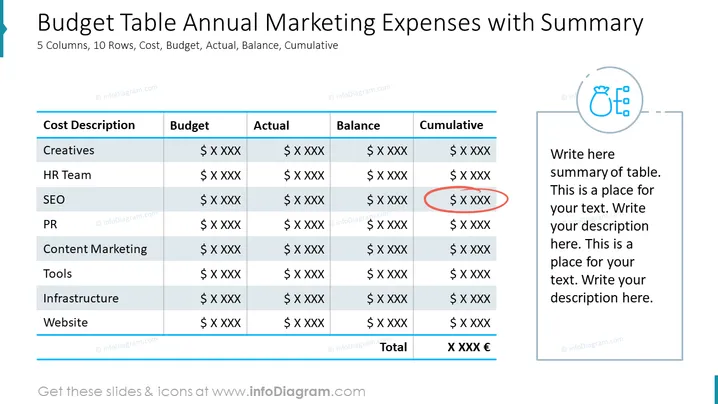
##Slide contents: The Marketing Expenses PPT Template can be used if you want to create a professional marketing budget PPT presentation. A budget plan is an important part of marketing, so it is important to set up a marketing plan that can cover the marketing costs of your campaigns. You can use this budget PowerPoint Template to manage your marketing expenses such as digital marketing campaigns, business campaigns, public relations, and advertising. This budget table is made up of 5 columns and 10 rows. The 5 columns include cost description, budget, actual, balance, and cumulative. The 10 rows consist of creatives, HR team, SEO, PR, content marketing, tools, infrastructure, and website. At the bottom of the table, you can write the total charge. This will help you compare your marketing fee to other costs in order to make sure you're not spending a lot of money. You can use this slide if you are a marketing manager who wants to present the annual marketing costs of each activity to your audience. It will help you display the cost description of each activity clearly, and you will be able to know the total price of each one accurately. There is a space next to the table if you want to write a summary of your presentation. This slide is editable, and you can change, the design, color, and graphic according to your preference. You can download this template in other formats, such as Google Slides and Keynote. ##Slide Infographic Description: White Background, Text Box, Table Chart, Costs Icon, Dollar Money, Euro Money
How to Edit
How to edit text & colors

How to expand / shorten diagram

How to Replace Icons in infoDiagram PPT


