
Reviews
Sus gráficos añaden un toque agradable a mis presentaciones y recientemente los usé para una de mis reuniones generales. Su conjunto de herramientas añade profesionalismo a mis diapositivas. En lugar de usar imágenes prediseñadas estándar.
Necesitaba un aspecto fresco para algunas de mis diapositivas. Había intentado encontrar una forma de crear un efecto de pincel, de subrayar, acentuar, añadir algo de color y los marcadores escritos a mano fueron justo lo que necesitaba. Muy fácil de usar, fácil de ajustar el tamaño, cambiar el color. Fue una solución asequible y perfecta, y estoy feliz de recomendarla.
El aspecto nítido y limpio de los gráficos, y el hecho de que me permitiera editar y cambiar fácilmente los colores para que coincidieran con la plantilla fue mi principal razón para comprarlos.
Description
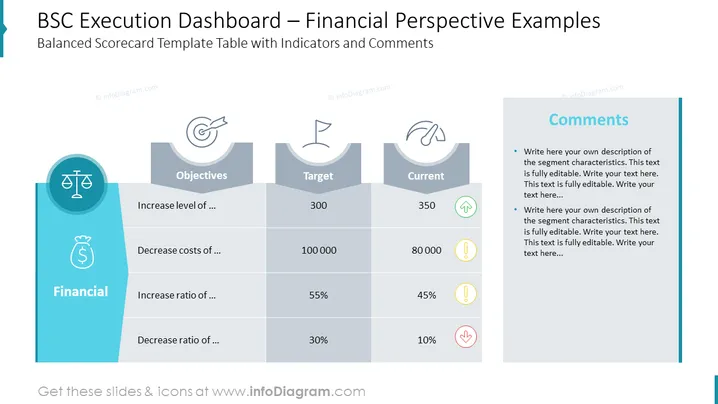
BSC Execution Dashboard – Financial Perspective Examples
Slide Content
This slide provides examples of a Balanced Scorecard (BSC) approach focused on the financial perspective for executing business strategies. Objectives are listed, such as "Increase level of..." and "Decrease costs of...," with targets and current status provided alongside indicators. This template is designed to track and comment on financial objectives, measuring actual performance against goals and indicating areas where attention may be needed through visual cues like upward or downward arrows and caution symbols.
Graphical Look
- The slide background is white, providing a clean and neutral canvas for the content.
- On the left side, there is a vertical blue banner with the word "Financial" and icons symbolizing financial objectives: a scale, a bag of money, and arrows indicating increase or decrease.
- Four columns are labeled "Objectives," "Target," "Current," and "Comments" with a gray header and white text.
- Rows under "Objectives" contain text placeholders for specific financial goals.
- Under "Target" and "Current," numerical values are provided for each objective, accompanied by icons such as a green upward arrow, a yellow caution sign, and a red downward arrow to indicate performance trends.
- The "Comments" column on the right side has a blue background and contains two bulleted text placeholders for additional explanations or notes.
- The overall layout is a table format, with divider lines creating a clear separation between the different components.
The slide has a professional and structured design, with a clear emphasis on tracking financial performance metrics. The use of icons and color coding visually guides the viewer to understand performance at a glance.
Use Cases
- Presenting quarterly or annual financial reviews to executive teams or stakeholders to evaluate performance against targets.
- Reviewing and discussing departmental or project budget performance during meetings.
- Training sessions for managers or employees on how to utilize Balanced Scorecard techniques for financial reporting.
- Strategic planning meetings where financial goals and objectives are set, and past performance is analyzed to inform future decisions.
How to Edit
How to edit text & colors

How to expand / shorten diagram

How to Replace Icons in infoDiagram PPT


