

Your graphics add a nice touch to my presentations and I recently used them for one of my all-hands meetings. Your toolbox adds professionalism to my slides. Instead of using standard clipart.
Claude Jones, Director of Engineer, @Walmartlabs, USA

Your graphics add a nice touch to my presentations and I recently used them for one of my all-hands meetings. Your toolbox adds professionalism to my slides. Instead of using standard clipart.
Claude Jones, Director of Engineer, @Walmartlabs, USA
I needed a fresh look at some of my slides. I've tried to find a way to create a paintbrush effect, to underline, accentuate, add some color and the handwritten markers were just the things. Very easy to use, easy to size, change the color. It was an affordable, perfect solution and I'm happy to recommend it.
Anonymous, US
The crisp, clean look of the graphics, and the fact that it allowed me to easily edit and change the colors to match the template was my main reason for purchasing them.
Brandie Jenkins, E-learning Developer, USA
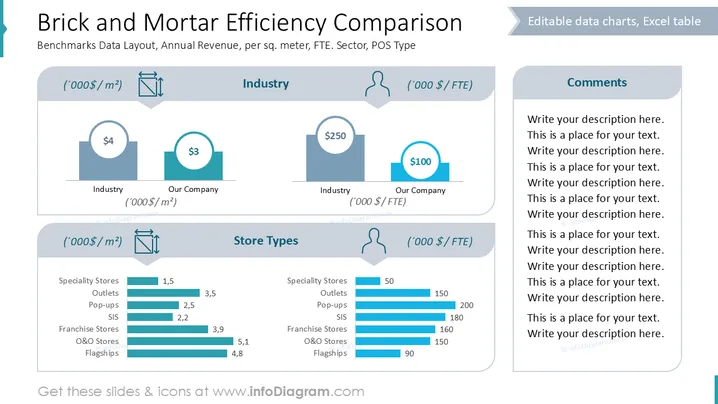
The slide compares the efficiency of brick and mortar retail locations by evaluating industry and company performance, annual revenue per square meter, and different store types. "Industry" section assesses general industry metrics versus the company’s figures, providing insights into revenue efficiency. "Store Types" highlights how various store models like specialty or flagship stores perform in terms of financial return per area and full-time equivalent (FTE) metrics.
The overall design is orderly and uses color contrasts to differentiate between sections, enhancing the readability and visual appeal. Clear graphical elements assist in understanding complex data.



