
Reviews
Ihre Grafiken verleihen meinen Präsentationen eine nette Note, und ich habe sie kürzlich für eines meiner All-Hands-Meetings verwendet. Ihre Toolbox verleiht meinen Folien Professionalität, anstatt Standard-Clipart zu verwenden.
Ich brauchte einen neuen Blick auf einige meiner Folien. Ich habe versucht, einen Weg zu finden, einen Pinselschlag-Effekt zu erzielen, um zu unterstreichen, hervorzuheben, Farbe hinzuzufügen, und die handgeschriebenen Markierungen waren genau das Richtige. Sehr einfach zu bedienen, leicht in der Größe zu ändern, die Farbe zu ändern. Es war eine erschwingliche, perfekte Lösung und ich empfehle sie gerne weiter.
Die klare, saubere Optik der Grafiken und die Tatsache, dass ich die Farben leicht bearbeiten und an die Vorlage anpassen konnte, war mein Hauptgrund für den Kauf.
Description
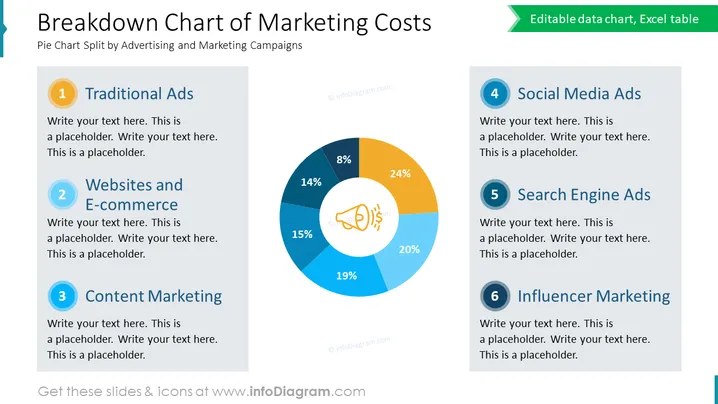
Breakdown Chart of Marketing Costs
Slide Content
The slide is a visual representation of the distribution of marketing costs across six categories. The categories include: Traditional Ads, Websites and E-commerce, Content Marketing, Social Media Ads, Search Engine Ads, and Influencer Marketing. These categories are meant to provide insight into where a company's advertising budget is being spent—with Traditional Ads and Influencer Marketing typically representing older and newer marketing channels, respectively. Each category is accompanied by a placeholder for additional text, suggesting the slide is customizable according to specific data or discussion points.
Graphical Look
- A large, colorful pie chart dominates the center of the slide, illustrating the percentage breakdown of marketing costs.
- Six numbered and colored circles to the left and right of the pie chart correspond to the segments within the chart.
- Each of the six circles is paired with a text box containing a placeholder for descriptive text.
- The pie chart uses shades of blue, orange, and a single segment in yellow, each labeled with a percentage.
- A central icon within the pie chart represents marketing, enhancing the theme of the slide.
- The slide maintains a clean and modern aesthetic with bold colors that draw attention to specific areas.
- The background is plain white, with the slide's title at the top in large, dark text, and a subtitle in smaller teal text underneath.
The slide has a professional and crisp appearance that efficiently conveys information through the use of color and simple graphics. The design facilitates quick interpretation of data and easy customization for various presentations.
Use Cases
- Presenting an overview of marketing budget allocation in a company's quarterly or annual review.
- Comparing historical versus planned marketing spend in strategic planning meetings.
- Showcasing the effectiveness of different marketing channels in a marketing strategy presentation.
- Providing a visual report to stakeholders on the return on investment (ROI) from various advertising campaigns.
How to Edit
How to edit text & colors

How to expand / shorten diagram

How to Replace Icons in infoDiagram PPT


