

Your graphics add a nice touch to my presentations and I recently used them for one of my all-hands meetings. Your toolbox adds professionalism to my slides. Instead of using standard clipart.
Claude Jones, Director of Engineer, @Walmartlabs, USA

Your graphics add a nice touch to my presentations and I recently used them for one of my all-hands meetings. Your toolbox adds professionalism to my slides. Instead of using standard clipart.
Claude Jones, Director of Engineer, @Walmartlabs, USA
I needed a fresh look at some of my slides. I've tried to find a way to create a paintbrush effect, to underline, accentuate, add some color and the handwritten markers were just the things. Very easy to use, easy to size, change the color. It was an affordable, perfect solution and I'm happy to recommend it.
Anonymous, US
The crisp, clean look of the graphics, and the fact that it allowed me to easily edit and change the colors to match the template was my main reason for purchasing them.
Brandie Jenkins, E-learning Developer, USA
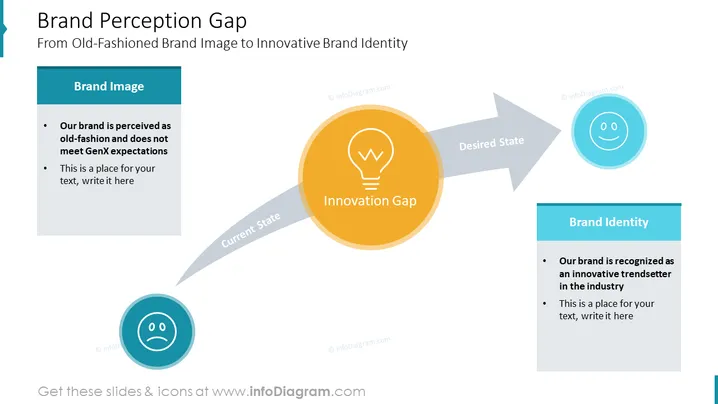
This slide presents the Brand Perception Gap within a company. It serves as a model for Renovation. It explains the process of transitioning from Old-Fashioned Brand Image to an Innovative Brand Identity. Brand Image - perceived as old fashion and does not meet GenX expectations. As the final stage is the brand Identity - The brand is recognized as an innovative trendsetter in the industry. Describe your Current State, tell your Innovation Gap and name the Desired State.
Editable Slide, White Background Slide, Rectangular Infographic Table Design, Grey Infographic Design, Color Frame, Bullet Points, Editable Text Blocks, Grey Curved Arrow Vector, Circle Outline Icon, Flat Icon, Lightbulb Icon, Innovation Icon, Happy Icon, Sad Icon, Smiling and Sad Emoji Icon



