
Reviews
Sus gráficos añaden un toque agradable a mis presentaciones y recientemente los usé para una de mis reuniones generales. Su conjunto de herramientas añade profesionalismo a mis diapositivas. En lugar de usar imágenes prediseñadas estándar.
Necesitaba un aspecto fresco para algunas de mis diapositivas. Había intentado encontrar una forma de crear un efecto de pincel, de subrayar, acentuar, añadir algo de color y los marcadores escritos a mano fueron justo lo que necesitaba. Muy fácil de usar, fácil de ajustar el tamaño, cambiar el color. Fue una solución asequible y perfecta, y estoy feliz de recomendarla.
El aspecto nítido y limpio de los gráficos, y el hecho de que me permitiera editar y cambiar fácilmente los colores para que coincidieran con la plantilla fue mi principal razón para comprarlos.
Description
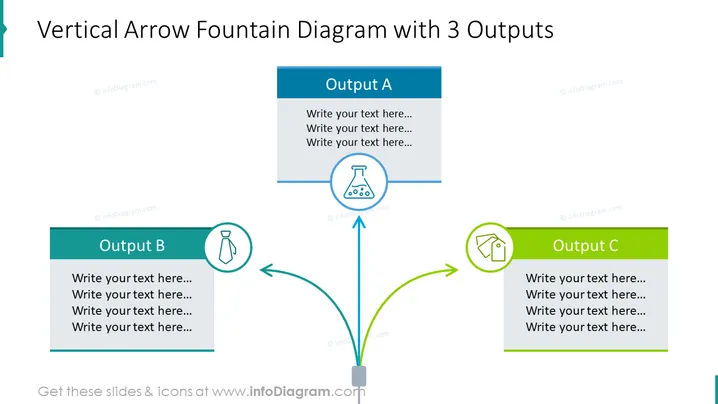
Vertical Arrow Fountain Diagram with 3 Outputs
Slide Content
The slide illustrates a process or an idea centralizing into a single point and then branching off into three different outcomes, labeled Output A, Output B, and Output C. Each output is accompanied by a place to write text, allowing for a detailed explanation of these individual outcomes. The central point suggests a convergence or a collection of inputs, which then diversify, symbolizing a variety of possible consequences or results from a central action or decision.
Graphical Look
- A large, vertical arrow originates from the bottom and splits into three separate arrows, each pointing towards a rectangular block.
- The central vertical arrow is connected to a square base at the bottom center of the slide.
- Each rectangular block contains the title 'Output' with a distinct letter (A, B, C) and has space for text underneath.
- Every output block is associated with a different color (dark blue for A, teal for B, and green for C) and has a unique icon to the left side: a beaker for Output A, a tie for Output B, and a house outline for Output C.
- The icons are circled, matching the colors of their corresponding output blocks.
- All text and icons are centered in their respective elements for a balanced appearance.
- The background of the slide is plain white which highlights the colored elements.
The slide features a clean and professional design with vibrant colored blocks and icons to clearly distinguish between different outputs. Its hierarchical structure and use of arrows effectively communicate the flow of information or decision-making process.
Use Cases
- Detailing different scenarios or outcomes from a central business strategy or decision.
- Showing the flow of processes in project management, where a single input leads to multiple pathways.
- Demonstrating product features or service offerings that stem from one core value or function.
- Illustrating divergent thinking or brainstorming results where one idea can lead to multiple innovations or solutions.
How to Edit
How to edit text & colors

How to expand / shorten diagram

How to Replace Icons in infoDiagram PPT


