
Reviews
Sus gráficos añaden un toque agradable a mis presentaciones y recientemente los usé para una de mis reuniones generales. Su conjunto de herramientas añade profesionalismo a mis diapositivas. En lugar de usar imágenes prediseñadas estándar.
Necesitaba un aspecto fresco para algunas de mis diapositivas. Había intentado encontrar una forma de crear un efecto de pincel, de subrayar, acentuar, añadir algo de color y los marcadores escritos a mano fueron justo lo que necesitaba. Muy fácil de usar, fácil de ajustar el tamaño, cambiar el color. Fue una solución asequible y perfecta, y estoy feliz de recomendarla.
El aspecto nítido y limpio de los gráficos, y el hecho de que me permitiera editar y cambiar fácilmente los colores para que coincidieran con la plantilla fue mi principal razón para comprarlos.
Description
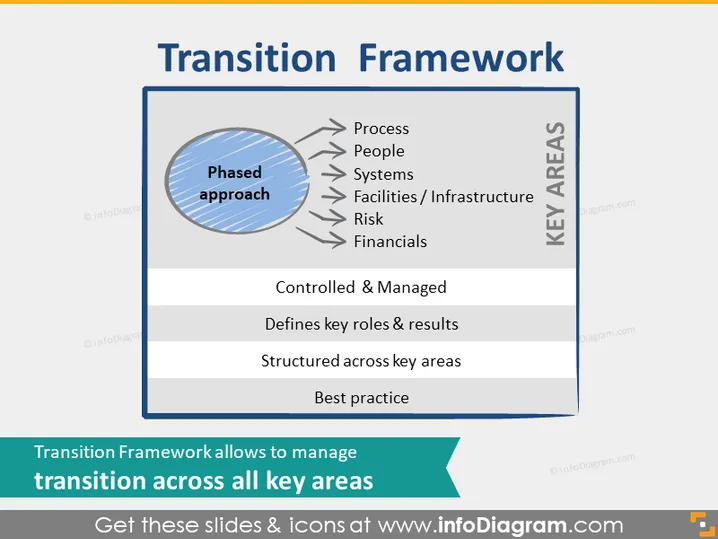
Transition Framework
Slide Content
The slide presents a "Transition Framework" using a phased approach. It lists key areas critical for successful transition management: Process (how workflows are designed), People (management and team dynamics), Systems (IT and operational tools), Facilities/Infrastructure (physical or virtual spaces), Risk (potential challenges or uncertainties), and Financials (economic aspects). The slide emphasizes that the approach should be controlled and managed, with structured key roles and results. It also notes the importance of following best practices.
Graphical Look
- The slide has two main content areas: a left blue circle with diagonal stripes and the term "Phased approach" and a right grey rectangle titled "KEY AREAS."
- A set of six arrows emerges from the circle, pointing towards the rectangle, each arrow leading to an individual line item within the key areas.
- The background of the slide is white.
- The font colors vary, with "Transition Framework" in dark grey, "Phased approach" in white, and the key areas and descriptions in black.
- The shapes include a circle and rectangle with a 3D effect, and flat arrows.
The slide has a clean and professional look with contrasting colors and a clear separation between concepts. The three-dimensional effects suggest depth and make the centerpiece stand out.
Use Cases
- Explaining the steps involved in a company restructuring during an executive meeting.
- Outlining the transition management plan in project management training.
- Detailing the components of a change management strategy to stakeholders.
- Illustrating the phased implementation of a new system to a cross-departmental team.
How to Edit
How to edit text & colors

How to expand / shorten diagram

How to Replace Icons in infoDiagram PPT


