

Your graphics add a nice touch to my presentations and I recently used them for one of my all-hands meetings. Your toolbox adds professionalism to my slides. Instead of using standard clipart.
Claude Jones, Director of Engineer, @Walmartlabs, USA

Your graphics add a nice touch to my presentations and I recently used them for one of my all-hands meetings. Your toolbox adds professionalism to my slides. Instead of using standard clipart.
Claude Jones, Director of Engineer, @Walmartlabs, USA
I needed a fresh look at some of my slides. I've tried to find a way to create a paintbrush effect, to underline, accentuate, add some color and the handwritten markers were just the things. Very easy to use, easy to size, change the color. It was an affordable, perfect solution and I'm happy to recommend it.
Anonymous, US
The crisp, clean look of the graphics, and the fact that it allowed me to easily edit and change the colors to match the template was my main reason for purchasing them.
Brandie Jenkins, E-learning Developer, USA
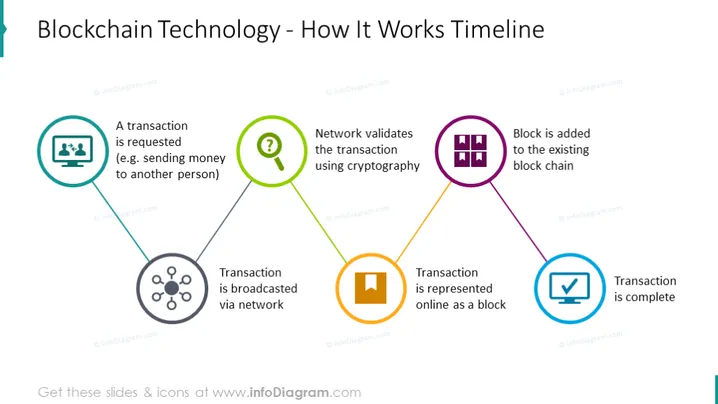
The slide explains the workflow of blockchain technology through a five-step timeline. Initially, a transaction is requested, such as sending money to another person, which means initiating a process like a payment. The transaction is then broadcasted via network, indicating the sharing of transaction details across the network's participants. Next, the network validates the transaction using cryptography, ensuring that the transaction is secure and legitimate. Once validated, the transaction is represented online as a block, which means it's packaged into a block ready for the blockchain. Finally, the block is added to the existing block chain, and the transaction is complete, signifying the official recording of the transaction on the blockchain.
The slide features a clear and straightforward design with visually distinct elements to guide the viewer through the blockchain process. The icons are simple yet meaningful, and the connecting lines create a natural flow that is easy to follow.



