

Your graphics add a nice touch to my presentations and I recently used them for one of my all-hands meetings. Your toolbox adds professionalism to my slides. Instead of using standard clipart.
Claude Jones, Director of Engineer, @Walmartlabs, USA

Your graphics add a nice touch to my presentations and I recently used them for one of my all-hands meetings. Your toolbox adds professionalism to my slides. Instead of using standard clipart.
Claude Jones, Director of Engineer, @Walmartlabs, USA
I needed a fresh look at some of my slides. I've tried to find a way to create a paintbrush effect, to underline, accentuate, add some color and the handwritten markers were just the things. Very easy to use, easy to size, change the color. It was an affordable, perfect solution and I'm happy to recommend it.
Anonymous, US
The crisp, clean look of the graphics, and the fact that it allowed me to easily edit and change the colors to match the template was my main reason for purchasing them.
Brandie Jenkins, E-learning Developer, USA
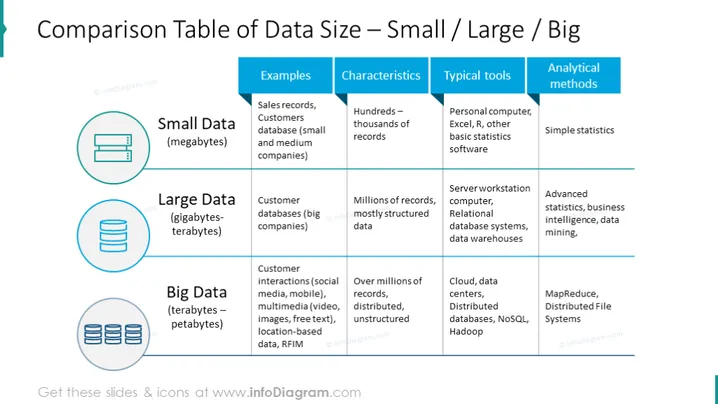
This data size comparison PowerPoint template explains everything one must know about data storage. Small data (megabytes) - found in sales records, and customer databases for small and medium companies. The characteristics of small data are hundreds or thousands of records, and the typical tools are PC, Exel, R, and other basic statistics software, whereas the analytical method is simple statistics. Large data (gigabytes and terabytes) - used in customer databases for big companies; millions of records, mostly structured data; tools - server workstation computers, relational database systems, and data warehouses; analytical methods - advanced statistics, business intelligence, and data mining. Big Data (terabytes, petabytes) - customer interactions (social media, mobile), multimedia (video, images, free text), location-based data, and RFIM; over millions of records, distributed and unstructured; tools - cloud, data centers, distributed databases, NoSQL, Hadoop. Analytical methods used in big data are MapReduce, and Distributed File Systems. This slide has editable shapes and can be downloaded in Google Slides and Keynote without quality loss.
##Slide infographic description:
Table Layout, Small Data Icon, Big Data Icon, Large Data Icon, Flat Outline Icons, Blue Banners



