

Your graphics add a nice touch to my presentations and I recently used them for one of my all-hands meetings. Your toolbox adds professionalism to my slides. Instead of using standard clipart.
Claude Jones, Director of Engineer, @Walmartlabs, USA

Your graphics add a nice touch to my presentations and I recently used them for one of my all-hands meetings. Your toolbox adds professionalism to my slides. Instead of using standard clipart.
Claude Jones, Director of Engineer, @Walmartlabs, USA
I needed a fresh look at some of my slides. I've tried to find a way to create a paintbrush effect, to underline, accentuate, add some color and the handwritten markers were just the things. Very easy to use, easy to size, change the color. It was an affordable, perfect solution and I'm happy to recommend it.
Anonymous, US
The crisp, clean look of the graphics, and the fact that it allowed me to easily edit and change the colors to match the template was my main reason for purchasing them.
Brandie Jenkins, E-learning Developer, USA
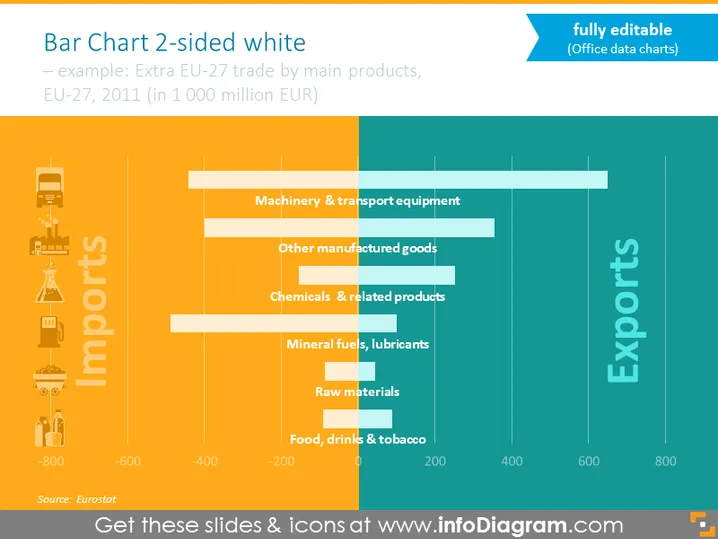
The slide presents a two-sided horizontal bar chart comparing imports and exports of the EU-27 in 2011. It shows data on trade by main product categories in billion EUR. For imports, the categories are listed from the bottom as Food, drinks & tobacco; Raw materials; Mineral fuels, lubricants; Chemicals & related products; Other manufactured goods; and Machinery & transport equipment. Each of these categories shows a negative value, representing the money spent on imports. For exports, the values are positive, suggesting revenue earned.
The overall look of the slide is professional and visually balanced, with a clear contrast between the import (orange) and export (blue) data. The icons and color gradation make the data easily readable and visually engaging.



